



For more details on other services and a closer look at Bluehost, check out the articles below.
Objective expert review Bluehost.com
Bluehost VPS Review 2025
I recently got to assess Bluehost's VPS hosting plans, testing everything from their performance, their prices, what VPS management panel they include, and the overall value they offer to you, the end user.
Their managed virtual private server (VPS) plans provide a big jump in power from their shared hosting plans, it comes with dedicated resources and much more control. While they might not be the most budget-friendly provider on the market (probably one of the more expensive providers), Bluehost is one of the big names, and they are very popular among shared hosting users, especially beginners. However, VPS servers are a huge step up, and are designed for users that need more resources, performance, and isolation than standard shared hosting can provide, but aren't quite ready for a dedicated server yet.

While you will find plenty of reviews and articles on the internet that rates Bluehost as a solid hosting provider, I believe in getting my hands dirty and seeing the results for myself.
In this review, I will look at their VPS platform, its performance, pricing, features, support structure, and more, to give you all the information needed to decide if they are the right fit for your needs or not.
Bluehost VPS Plans Overview
Let's get straight to what would be the deciding factor for most users - the pricing, as this is probably the first thing that will catch your eye when browsing for a new provider.
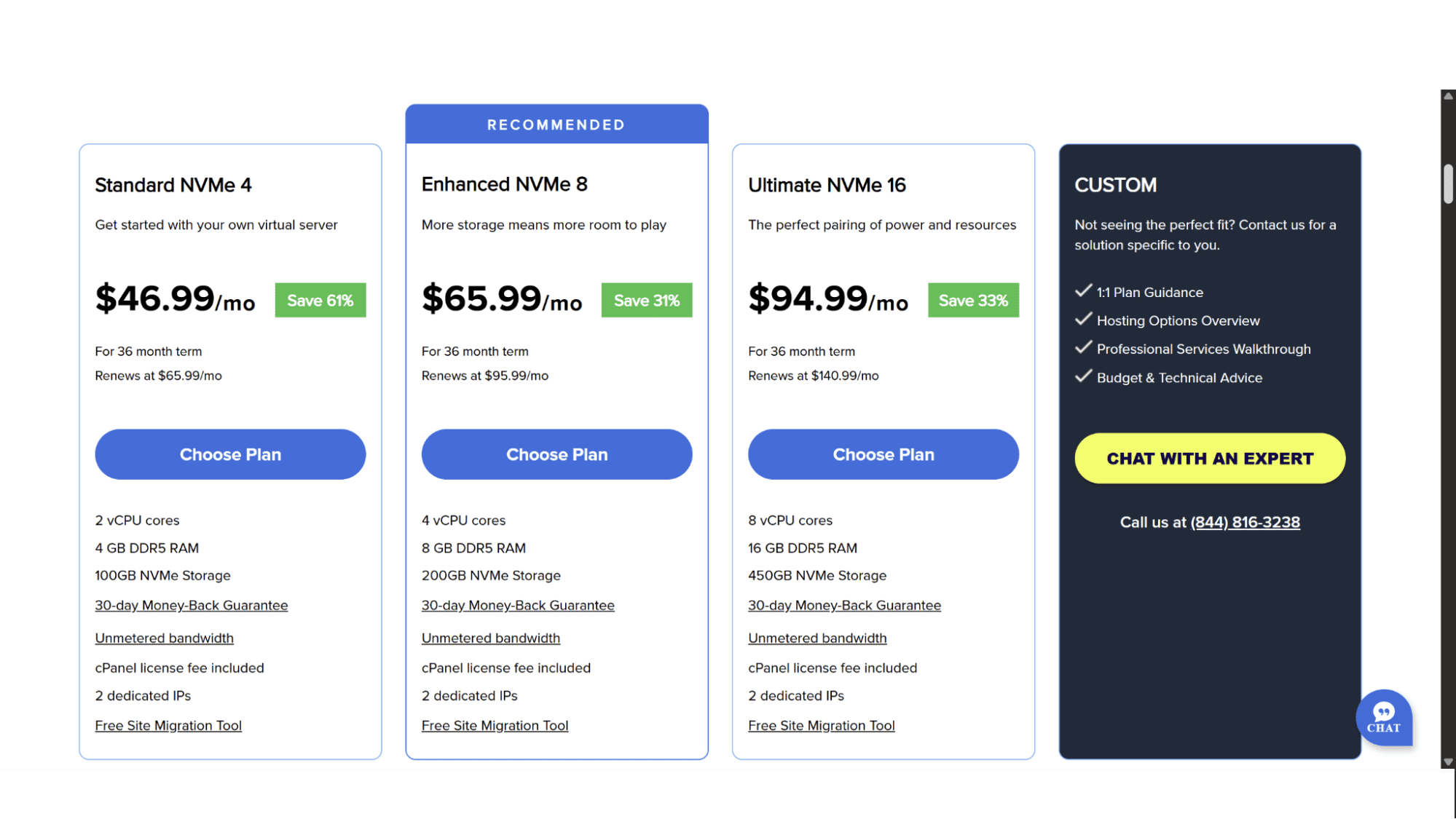
Bluehost’s VPS plans are available in three options, the Standard NVMe 4, the Enhanced NVMe 8, and the Ultimate NVMe 16, as well as an option to create your own custom VPS server by contacting their support with your requirements. Their plans are not cheap..at all, but one has to take into consideration what’s included, and in my opinion, you definitely get a lot of bang for your buck! All servers run on AMD EPYC processors, DDR5 RAM, blazing-fast NVMe drives, and come with a 30-day money-back guarantee, unmetered bandwidth, cPanel, 2 dedicated IP addresses, and a free website migration tool. Let’s look at what each plan includes:
The Standard NVMe 4 Plan
This is the entry point into Bluehost's VPS world and comes in at $46.99 per month. It includes 2 vCore CPUs, 4GB DDR5 RAM, and 100GB NVMe Storage. This plan is ideally suited for a single, high-traffic website or a handful of medium-traffic sites. Excellent specs, but not entirely sure if it is worth that much per month, to be honest.
The Enhanced NVMe Plan
Made for Growing Businesses & Resource-Intensive Applications.
This is their most popular VPS option and is often considered the sweet spot for many small to medium-sized businesses. It doubles down on the Standard plan with 4 vCore CPUs, 8 GB DDR5 RAM, and 200GB NVMe disk space. The added resources should comfortably handle significant traffic spikes and more complex applications, but it will set you back $65.99 per month.
The Ultimate NVMe Plan
Their Top-Tier VPS Powerhouse
This plan comes in at an eye-watering $94.99 per month, and boasts 8 vCore CPUs, 16GB DDR5 RAM, and 450GB super-fast NVMe storage. It is designed for large, resource-intensive websites, advanced applications, or even developers managing multiple, extensive projects, and provides ample room for growth.
Their VPS plans are available in monthly, annual, biennially, or triennial signups, with the more discount being applied on checkout the longer you commit for. At the time of writing, they didn’t offer any coupons for additional discounts, however, their support did confirm that they run promotions from time to time and will provide coupons then. When you evaluate the cost, remember you are paying for a managed service, which adds value compared to an unmanaged VPS from other providers.
The Purchase and Registration Process
Signing up for Bluehost's VPS hosting is a remarkably easy and streamlined process. You just need to go to their home page (bluehost.com) and click on “Hosting” in the top main menu. It will display a dropdown menu where you can click on “VPS Hosting”. Then simply make your pick between the available plans and click on “Choose Plan”.
The next page is where you choose your preferred free domain name. Type the domain name you are after in the space provided. If it is unavailable, it will ask you to choose another name, and if it is available, it will automatically direct you to the next page, where you can choose your billing cycle.

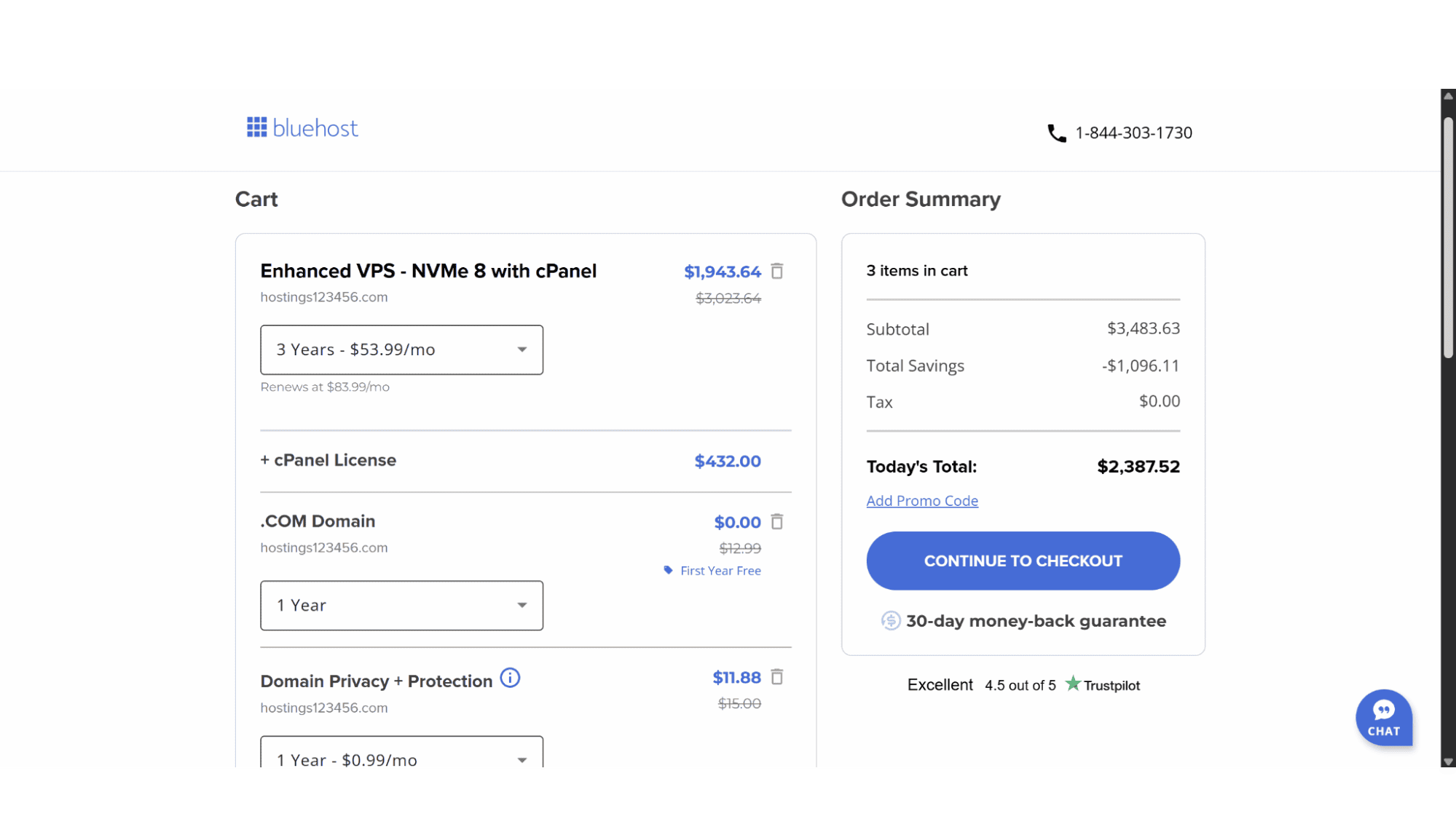
The right-hand side will display a summary, and if you click on the “Continue to Checkout” button, it will take you to the last step of the process, where you need to enter your personal details and payment method.
Key Features
- AMD EPYC Processors;
- NVMe Disk Space;
- 30-day Money-Back Guarantee;
- Fully Managed Servers;
- Free Backups;
- Free SSL Certificates;
- Free Domain;
- Unlimited Bandwidth;
- Free Staging Environment;
- cPanel Control Panel;
- Docker Support.
Support
The support Bluehost offers is a bit of a mixed bag. They offer 24/7 assistance via live chat, or you can reach them by phone between the hours of 7 am and 12 am Eastern Time. Their agents are swift to respond, knowledgeable, and will help you with anything from issues with your website, emails, restoration, and all related emails, to domains, DNS records, and backups.

It is worth noting that they don’t offer any kind of email support, and in the event that there is a requirement for a support ticket, then they will raise the tickets from their end.
If you prefer to do the troubleshooting yourself, you can access their knowledge base by clicking the “Knowledge Base” tab in the website footer. It is loaded with helpful articles about most of the common issues you might encounter, and how to fix them.
Performance and Scalability
Performance is where a VPS needs to shine, and Bluehost delivers a solid, reliable experience. The servers run on powerful AMD EPYC CPUs with DDR5 RAM, and the use of NVMe solid-state drives (SSDs) across all plans ensures fast data access and load times.
To scale up (or down) is straightforward, too. If you start on the Standard plan, for example, and find you need more resources, upgrading to a higher plan is a relatively seamless process orchestrated by Bluehost's support team. It typically involves a server change and a very minimal amount of downtime, so it's best planned during low-traffic periods.
Security
Security on a Bluehost VPS is a shared responsibility between them and you as the end user. As a managed hosting company, Bluehost provides a strong foundation. They ensure the physical security of their data centers, the integrity of the underlying hardware and network with dedicated firewalls, real-time monitoring, and by applying essential security patches to the core OS.
Their VPS plans also include the following features:
- Free SSL Certificate: Included for all domains, ensuring encrypted data transfer.
- Secure Shell (SSH) Access: Allows for secure remote server management.
- Multi-factor authentication (MFA): An optional but highly recommended layer of security for your account login.
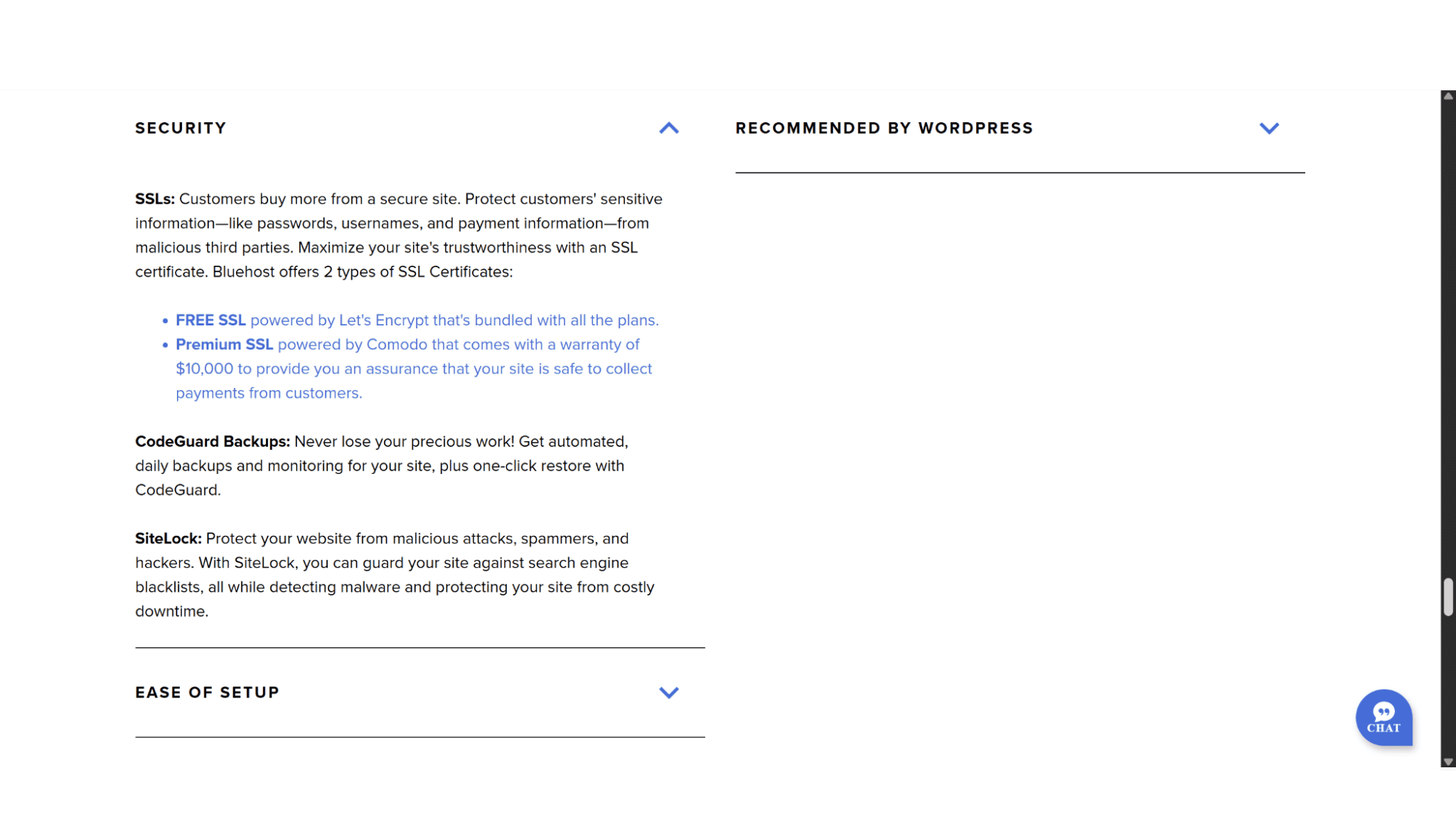
- CodeGuard Backups: Automated backups with a one-click restore option
- SiteLock: Protects your site from malware, spammers, hackers, and against search engine blacklisting.
However, you get full root access, and this means the ultimate security of your applications and websites falls on you. You are responsible for securing your cPanel and application logins, keeping your software (like WordPress plugins) updated, and configuring any firewalls beyond the standard setup.
| Pros: | Cons: |
|
User-Friendly: The managed service and familiar cPanel interface make it accessible. Powerful Hardware: Reliable performance with SSD storage and scalable resources. Root Access: Grants advanced users the control they need without sacrificing the managed convenience. Strong Feature Set: Includes essential tools like free SSL, a backup system, and multi-server management. |
Renewal Pricing: Even the introductory cost is rather expensive, but the standard renewal rate is significantly higher. No Email Support: While their agents are always available, the lack of email support and the fact that you can’t create tickets yourself can be hit or miss. |
Is Bluehost VPS the right choice for you?
Yes, if: You are a business owner, blogger, or developer who has outgrown shared hosting and wants a powerful, scalable solution without the hands-on hassle of server management. You value reliability and a familiar interface (cPanel) and are comfortable with the long-term pricing structure after the introductory period.
Maybe not, if: Your top priority is the absolute lowest cost, and you have the technical expertise to manage an unmanaged VPS from a provider like DigitalOcean or Vultr. Alternatively, if you require deeply technical, expert-level support on demand, a provider known for its advanced support, like InMotion, might be a better fit.
Ultimately, Bluehost's VPS hosting provides an excellent balance of power, convenience, and scalability. It’s a compelling option for those looking to make a serious investment in their hosting infrastructure without needing to become a full-time system administrator. Just be sure to go in with your eyes open regarding the renewal cost and have a coupon code ready for that initial sign-up.








