



For more details on other services and a closer look at Bluehost, check out the articles below.
Objective expert review Bluehost.com
Bluehost Email Hosting Review 2025
As an IT professional and long-time user of multiple web hosting services over the years, for myself as well as clients ranging from one-man bands, small businesses, to large corporations, email is, and probably always will be, the absolute backbone of any company’s daily operations. It’s not just about sending and receiving messages back and forth - it’s about professionalism, reliability, and seamless integration. Bluehost is a well-known name in the industry for shared hosting, servers, and, naturally, their email offerings, so I have decided to test their email services, looking beyond the basic webmail access and integrating it fully into my mail client to fully test it. In this review, I will cover everything from the registration and setup process to the initial login and advanced settings on desktop and mobile applications.

Bluehost Email Plans Overview
For business owners seeking a no-fuss email solution, Bluehost offers two streamlined plans designed to get you up and running quickly. It's important to note that these plans are built on standard mail protocols (POP3, IMAP, and SMTP), ensuring broad compatibility with most email clients. However, it's very important that you understand this type of setup. These services require you to already own a domain name, and they do not support Microsoft Exchange emails.
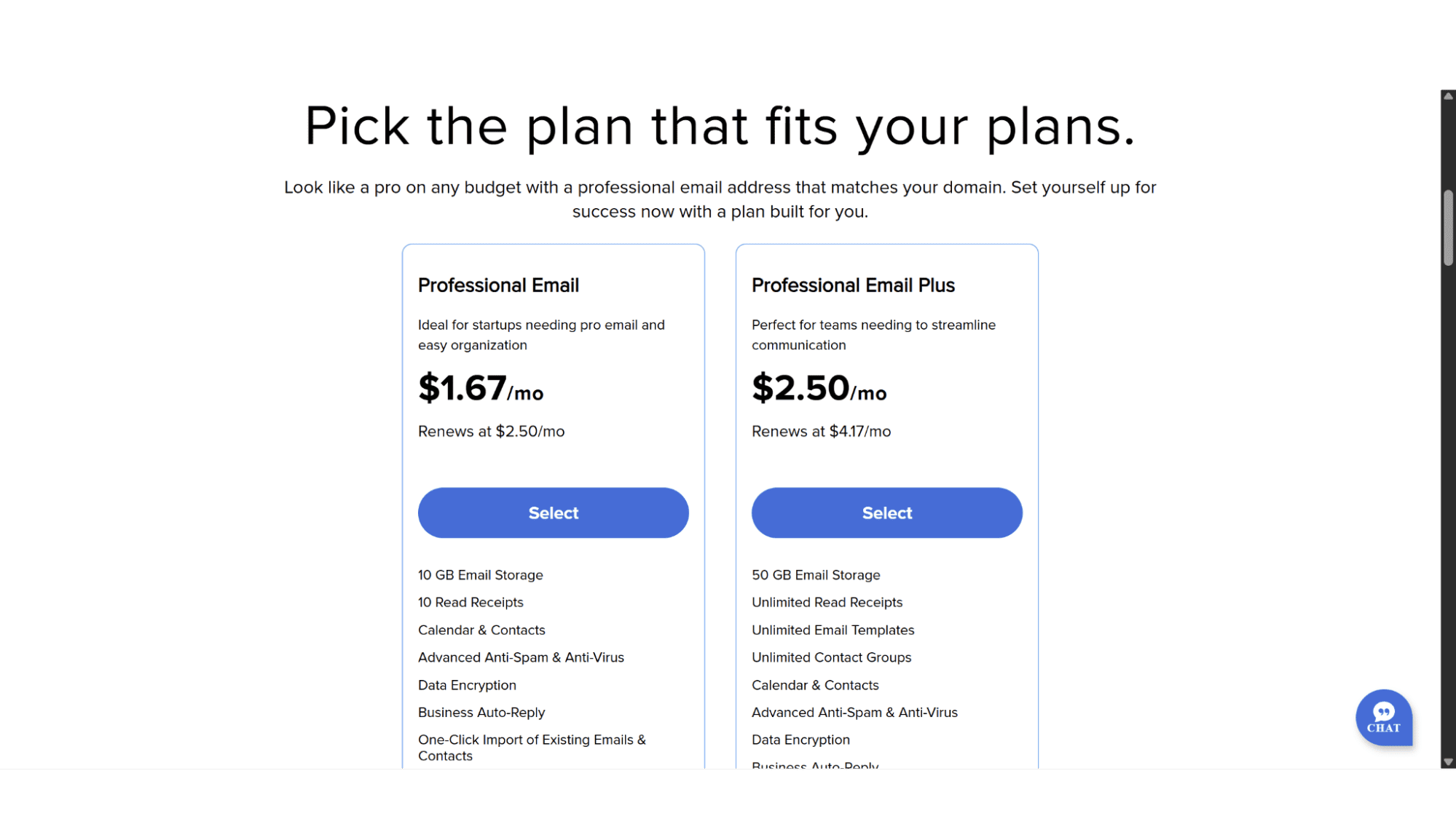
Let’s take a look at what each of the two plans offer.
1. Professional Email Plan – Perfect for startups and small businesses
With this plan, you can get email accounts at your own domain for $1.67 per mailbox per month (renews at $2.50 per month), which I feel is slightly on the expensive side, but taking into account the size of the mailbox and what’s included, it isn’t that bad. It comes with:
- 10GB Email Storage per mailbox;
- 10 Read Receipts;
- Calendar & Contacts;
- Advanced Anti-Spam & Anti-Virus;
- Data Encryption;
- Business Autoreply;
- One-Click Import of Existing Emails & Contacts.
2. Professional Email Plus Plan – Great for teams and growing organizations
A lot more expensive at $2.50 per mailbox per month (renews at a hefty $4.17 per month), but it offers five times the storage space and a whole lot of extra features. These mailboxes offer:
- 50GB Email Storage;
- Unlimited Read Receipts;
- Unlimited Email Templates;
- Unlimited Contact Groups;
- Calendar & Contacts;
- Advanced Anti-Spam & Anti-Virus;
- Data Encryption;
- Business Auto-Reply;
- One-Click Import of Existing Emails & Contacts;
- Send Later (you can schedule your emails to be sent at a certain time);
- Follow-Up Reminders;
- Turbo Search;
- Auto-Clean;
- Undo Send;
- Send as Alias;
- Grammar & Spell Check;
- HTML in Composer;
- Two-Factor Authentication;
- Priority Inbox;
- Email Labels.
Both plans (they are also known as Titan Email) are good options for any business, depending on the size and stage of operation. They both include anti-virus and anti-spam protection, which I feel is crucial. The Professional Email Plus plan takes this a step further by adding 2FA (two-factor authentication) for additional account protection. Although I like the way they have structured this plan, there are a lot of features that one would rarely use, such as “Send Later”, or “Send as Alias”, it's nice to have but not mission critical in my opinion. Another feature that can be somewhat unclear is that although they mention “Calendar Sharing” as a feature with their emails, the user you share it with also needs to be on “Titan Email”.
Key Features:
- Professional domain-based email addresses;
- Complimentary Anti-Virus & Anti-Spam Protection;
- Decent Amount of Storage Space;
- Data Encryption;
- One-Click Import of Existing Emails & Contacts;
- 24/7 Email Support;
- One can change the email address without losing the data.
Registration and Setting Up Your Account
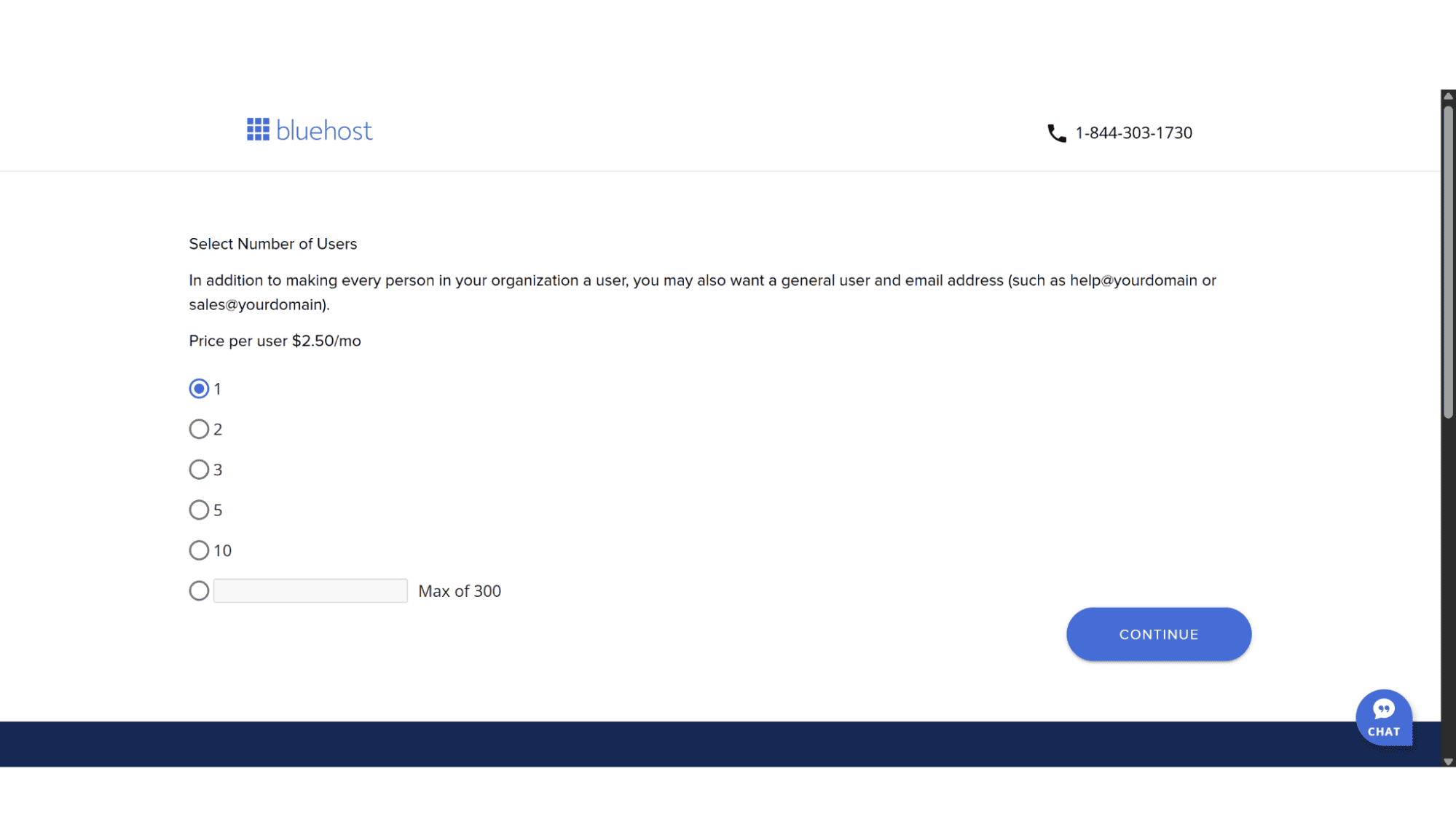
To sign up for one of Bluehost’s Professional Email plans, simply go to their home page (www.bluehost.com) and click on “Hosting” in the top main menu, then on “Professional Email” which is under the “Email Hosting” heading. It will display the two plans, and after making your choice click on “Select”. The next page will ask you to select the number of mailboxes needed, and after you click on “Continue,” it will bring you to the page where you can choose your domain name. Enter the name you would like. If it is available, you will be taken to the cart page with a summary of your products, and if it is not available, you will be asked to choose a different name. One should note, though, that these domain names are not free of charge, and they will bill you for the registration.
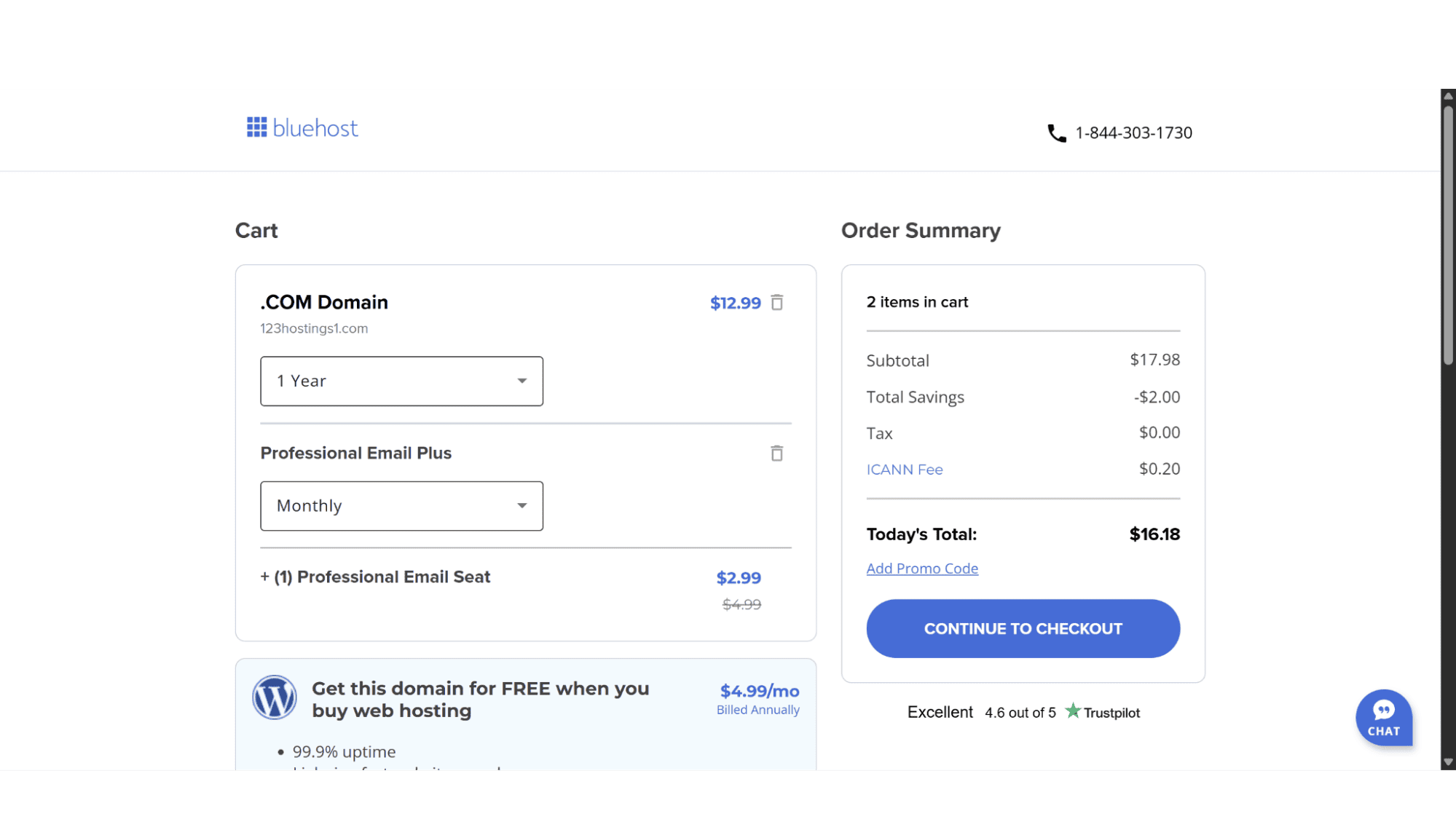
On the Cart page, you can select your billing cycle – for domain registrations, it will be either for 1, 2, 3, 4, or 5 years at a time, while the email plans only offer monthly or yearly subscriptions. To complete the process, click on “Continue” on the right-hand side, and their system will ask you for your personal details and payment method.
As soon as your account is active, you can login (top right on the main menu) and look for the email section. The process to create or add a new address is super-easy - click on “Email & Office”, then “Create New Account”, enter your desired address (for example info@mydomain.com) and create a strong password – that’s it!
Immediately after creation, you are presented with multiple pathways to access your mail, through the Bluehost webmail portal, or by configuring a third-party mail client, such as Outlook or Thunderbird, or via a mobile app on Android or iOS.
Setup:
Connecting your email box to an email client like Outlook or Thunderbird is a quick and straightforward process. Whether you choose IMAP for multi-device sync or POP for local storage, you only need three things - your email address, your password, and the server details (incoming and outgoing) from your account dashboard. Bluehost makes finding these details easy. Within your account dashboard interface or in cPanel, under the email section, go to settings (or in cPanel – Under cPanel Email), and you find everything you need. Here are the settings for both IMAP and POP mail setups:
- IMAP Incoming Mail Server: imap.titan.email
- POP Incoming Mail Server: pop.titan.email
- SMTP Server for both: smtp.titan.email
- Incoming Ports: IMAP (993 SSL/TLS), POP (995 SSL/TLS)
- SMTP Ports (465 SSL /TLS)
For those not sure what the difference is between POP and IMAP, here’s a short explanation. It is basically how and where your email is stored. POP (Post Office Protocol) is designed to download emails from the server onto a single device, often deleting them from the server afterward (although you can nowadays mark it to save a copy for a certain number of days). This makes emails accessible only on that specific computer and is ideal for local archiving.
In contrast, IMAP (Internet Message Access Protocol) keeps all emails on the server and simply syncs them across all your devices, working immediately by “pushing” email notifications in real-time. Any action you take, like reading, deleting, or moving emails into folders, is updated in real-time on every device, making IMAP the superior choice for modern, multi-device usability, although not quite at the level of Exchange mail.
Security:
Bluehost’s professional email solutions provides enterprise-grade security features including two-factor authentication (2FA) for account protection (on the Plus plan only), data encryption (TLS) for messages in transit and rest, spam and antivirus filtering to block any malicious attachments and content, and MTA-STS (Mail Transfer Agent-Strict Transport Security), an internet standard that allows an email domain owner to enforce a secure and encrypted connection when someone sends an email to them, to prevent downgrade attacks, and ensuring your communications are safe from threats. They also offer features like data loss prevention (DLP), Custom DKIM, and a high IP reputation for better email delivery. Pretty good security for POP and IMAP if you ask me.
Webmail:
This is a standard feature hosting providers offer that allows you to reach your inbox from any web browser by simply navigating to a secure webmail portal and authenticating with your full email address and password. It lacks the polished look and deep system integration of a dedicated email application like Gmail or Outlook, but it will get the job done.
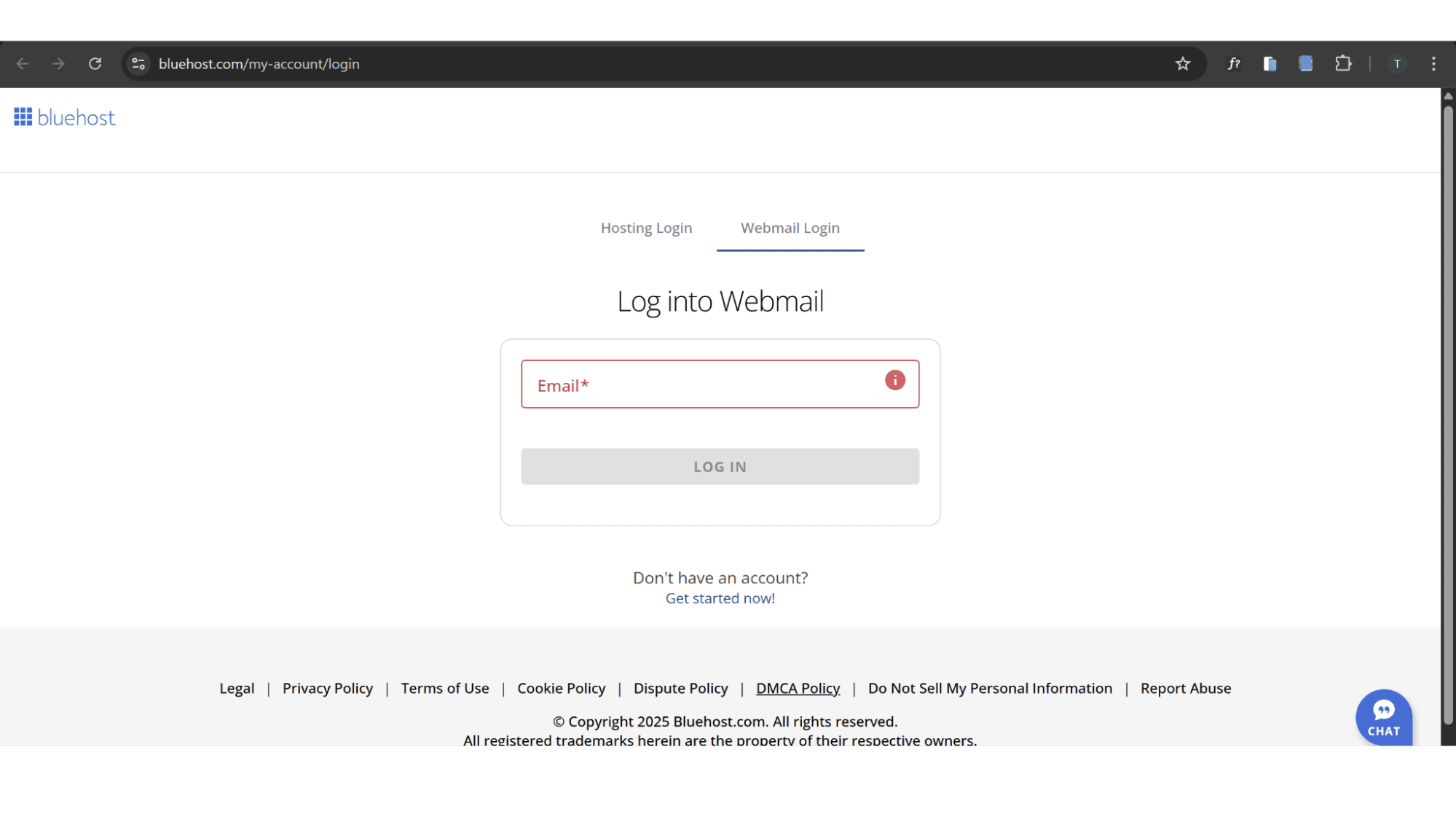
Bluehost primarily uses the Roundcube and Horde webmail clients, allowing users to choose between them when setting up their accounts. To Access your mail via Bluehost’s webmail portal, simply go to https://www.bluehost.com/my-account/login and click on “Webmail Login”, or you can navigate to yourdomain.com/webmail on any browser. It will ask for your email address and password to access your mail. A quick and easy way to communicate from any pc without the risk of storing login credentials on an unfamiliar device.
Support:
If you have signed up for one of their email plans and you need assistance, you can reach their agents via phone or through the live chat function on their website (bottom right). Their agents are well-trained, friendly and will help you to resolve your issues quickly.
There’s also a decent knowledge base with loads of articles to do troubleshooting yourself. To access it, click on “Knowledge Base” in the footer menu.

The Verdict
Who is Bluehost Professional Email Best Suited For?
| Pros: | Cons: |
|
|
My Final Thoughts for Bluehost Email Plans 2025:
Bluehost Professional Email is not trying to be the most advanced email suite on the market. It’s not competing directly with services such as Google Workspace or Microsoft 365 in terms of collaborative office tools. Instead, it aims to be a rock-solid, reliable, and deeply integrated email solution for individuals, small businesses, and freelancers who already host their website with Bluehost. The prices are not the cheapest out there, but you get a professional email service that is dependable, secure, and capable of powering your business communications without a second thought.








