



For more details on other services and a closer look at Bluehost, check out the articles below.
Objective expert review Bluehost.com
Bluehost cPanel in 2025
The Industry Standard, Tried, Tested and True.
Let’s be honest, if you have ever shopped around for hosting, or have been involved in the hosting industry at any level or for any period of time, and I ask you to quickly name a web hosting control panel, I can almost guarantee the one that will immediately come to mind. It’s the one that’s been the backdrop for countless of websites, the reliable workhorse, and industry favourite that has powered small businesses and massive online stores for what feels like forever. I’m talking, of course, about the cPanel control panel. And when you sign up for one of Bluehost’s hosting plans, you are getting this massively popular panel included.

As someone who’s logged into more control panels than I can count over my career, I thought this review should showcase if cPanel still hold up in an era of flashy, custom-created dashboard, or does it feel like a relic that has fallen behind times.
Having spent considerable time inside the Bluehost hosting environment for this piece, my verdict is nuanced. For better and for worse, cPanel on Bluehost is exactly what you’d expect - the industry standard, in all its powerful, sometimes overwhelming, glory, but let’s take a good look at exactly what you are getting.
First Impressions
After you have signed up for any of Bluehost’s hosting plans, their system will give you access to cPanel, well, their customized version at least. It doesn’t differ too much from the standard, classic interface, but their version does include some Bluehost-specific branding, as well as shortcuts that are prominently displayed to create a better UX.
For a complete newbie this initial view of the dashboard can be quite intimidating (and that’s putting it mildly). There’s a grid of multiple icons, each with cryptic names like "Apache Handlers," "RubyGems," or "MultiPHP Manager", which would probably make beginners hesitant to click on anything if they don’t know what it means. It’s a visual representation of raw power, but it’s not immediately intuitive. However, Bluehost has tried to soften this blow for newcomers as they include clear, helpful links to their knowledge base, which is more than decent in my opinion, and video tutorials available right on the dashboard, which is a nice touch.
Gaining Access
To access your Bluehost cPanel is a straightforward process.
If you have already signed up with Bluehost and your account is active, just click on the “login” button (you will find it at the top right corner of your screen). It will then ask you to enter your username and password. If your authentication was successful their system will direct you to your cPanel dashboard. Very easy and quick! Another way of getting access is to open your browser and type your domain name followed by “/cpanel” (yourdomain.com/cpanel). It will also ask you for the login details before granting access.
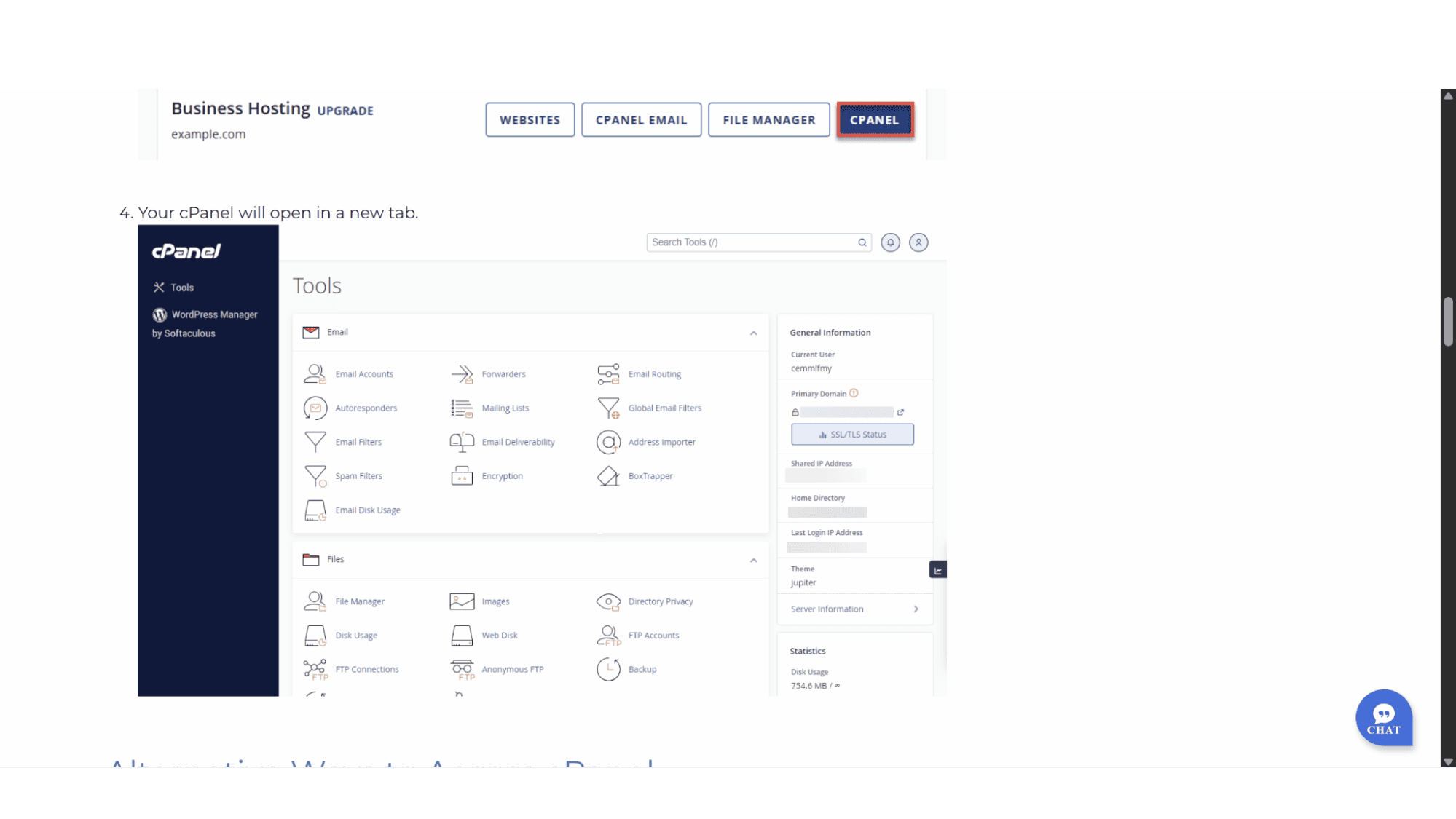
This direct access is great if, for any reason, their portal might be down, but you still need to access your panel without waiting for the portal to become active again. This, however, will be very rare that the portal goes down as Bluehost is one of the more reliable providers out there.
Key Features:
Once you get past the initial visual overload, the sheer power of cPanel on Bluehost becomes clear. This is where it separates itself from the newer, more simplified, and modern competitors.
Website & Domain Management: This is what cPanel was designed for and is the core of the whole user experience. The "Domains" and "Files" sections are where you will most likely spend a lot, if not most, of your time. Creating new domains and subdomains, or managing your files with the File Manager is a simple and easy process, which Oakley Capital (cPanel’s parent company) perfected over the years. The one-click WordPress installer does exactly what it implies – it will install WordPress (with one click) and get your site up and running in no time.
Email Management: These days, any hosting plan worth signing up for will come standard with a couple of emails at your own domain, and to manage these is a breeze with cPanel. If you need to create new addresses, manage existing users, delete accounts, or even create forwarding rules and autoreplies, simply click on the “email accounts” section and you will have all these options at your fingertips.
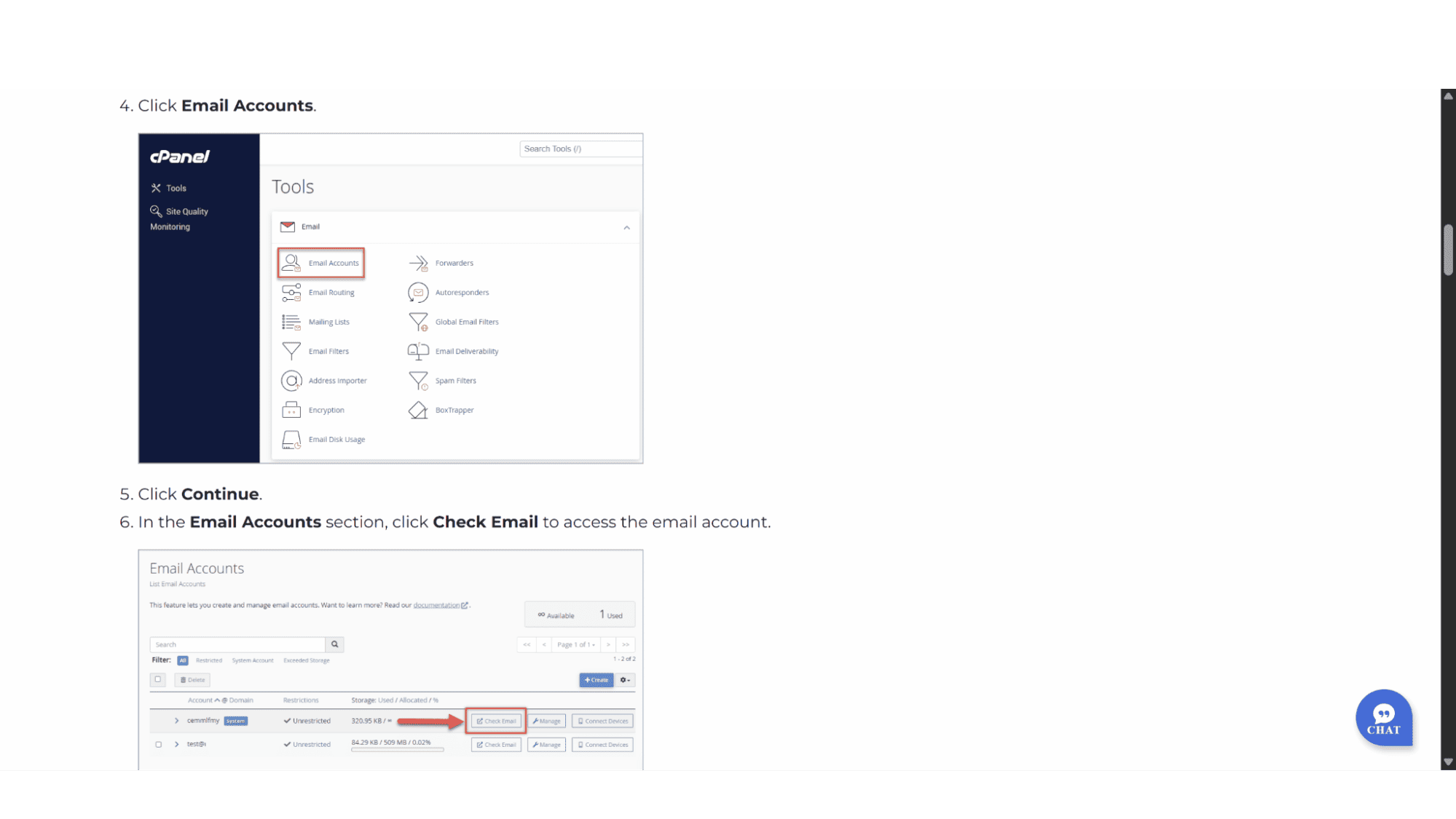
Webmail: It is common knowledge that one can view your mail via webmail using a specific URL provided by your hosting provider. But cPanel also offers an even easier way. There is an option to click “webmail” from within the cPanel dashboard and it open your mail on the server via the RoundCube app.
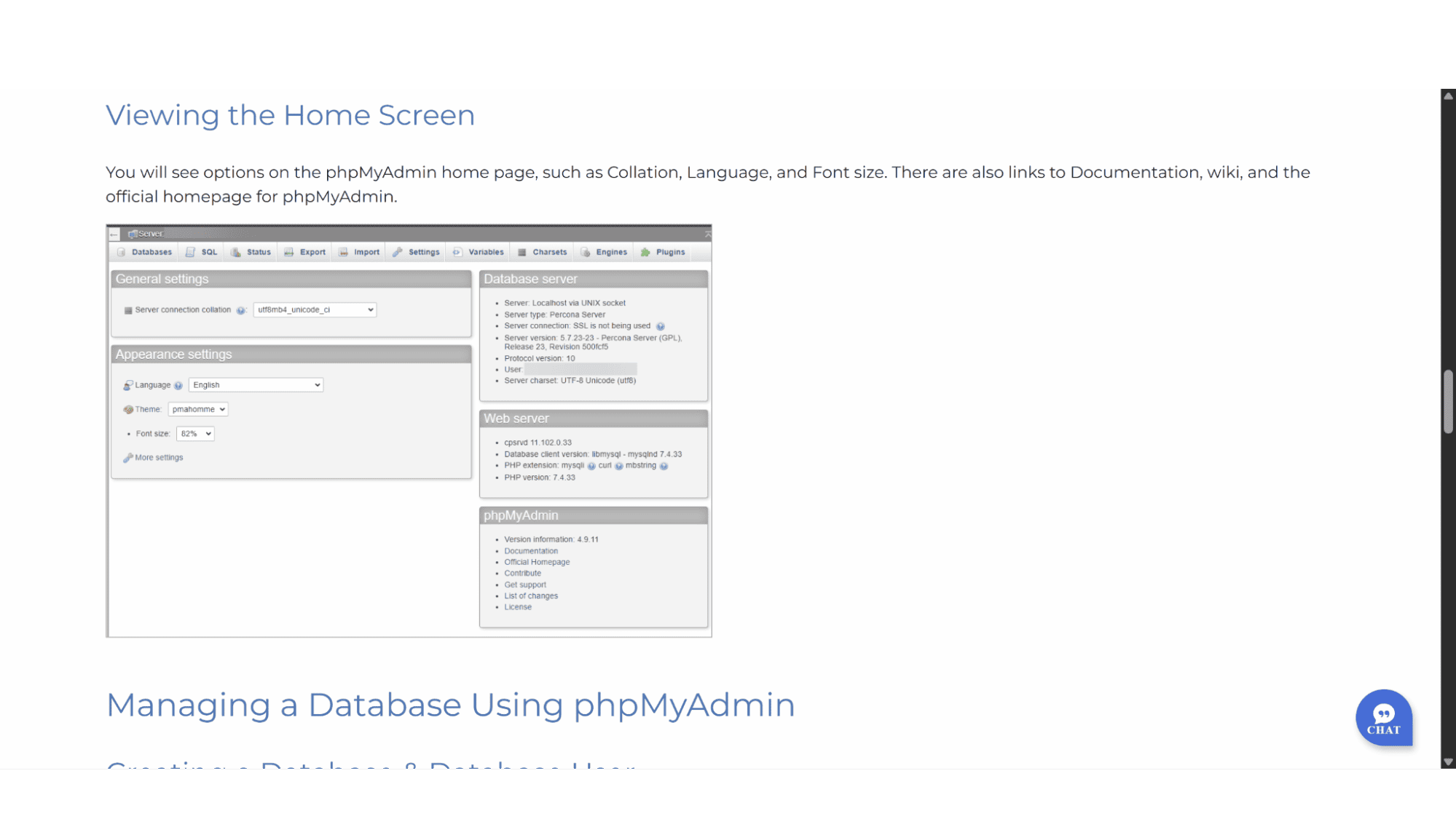
Database Control: For developers, the direct integration with phpMyAdmin is a massive time-saver. You can create, modify, and manage your MySQL databases without ever leaving the cPanel environment. It’s a very powerful tool, and although intimidating for beginners, it is essential for anyone needing to perform manual database operations, like running a search and replace query on a WordPress site after a domain migration.
Security & Backups: Bluehost’s cPanel comes standard with a decent set of security tools and features. One can easily install and manage your free Let’s Encrypt SSL certificate that is included in their plans, set up IP address denials/blocks, and password-protect directories, to name just a few. The backup function works well, once again a straightforward process, it allows you to generate and download full (or even partial) account backups. It is not automated however, but rather a manual process which I feel is super important. This ensures that your entire digital presence can be restored quickly should your data get compromised.
Beyond the Icons: The Advanced User's Playground
For me personally, where cPanel truly shines is in its advanced sections. The "Software" section comes with tools like "Select PHP Version," where you can not only choose your PHP version but also manage extensions with a few clicks. You would be surprised how many website still run on older PHP versions, and as hosting accounts get provisioned with the newest PHP versions, this could give your site a “There has been a critical error on this website”, which can be easily fixed by just changing the PHP version. What’s more, the "Advanced" section grants you access to some other very handy features like Terminal (SSH access), Cron Jobs for scheduling tasks, and managing Apache handlers.
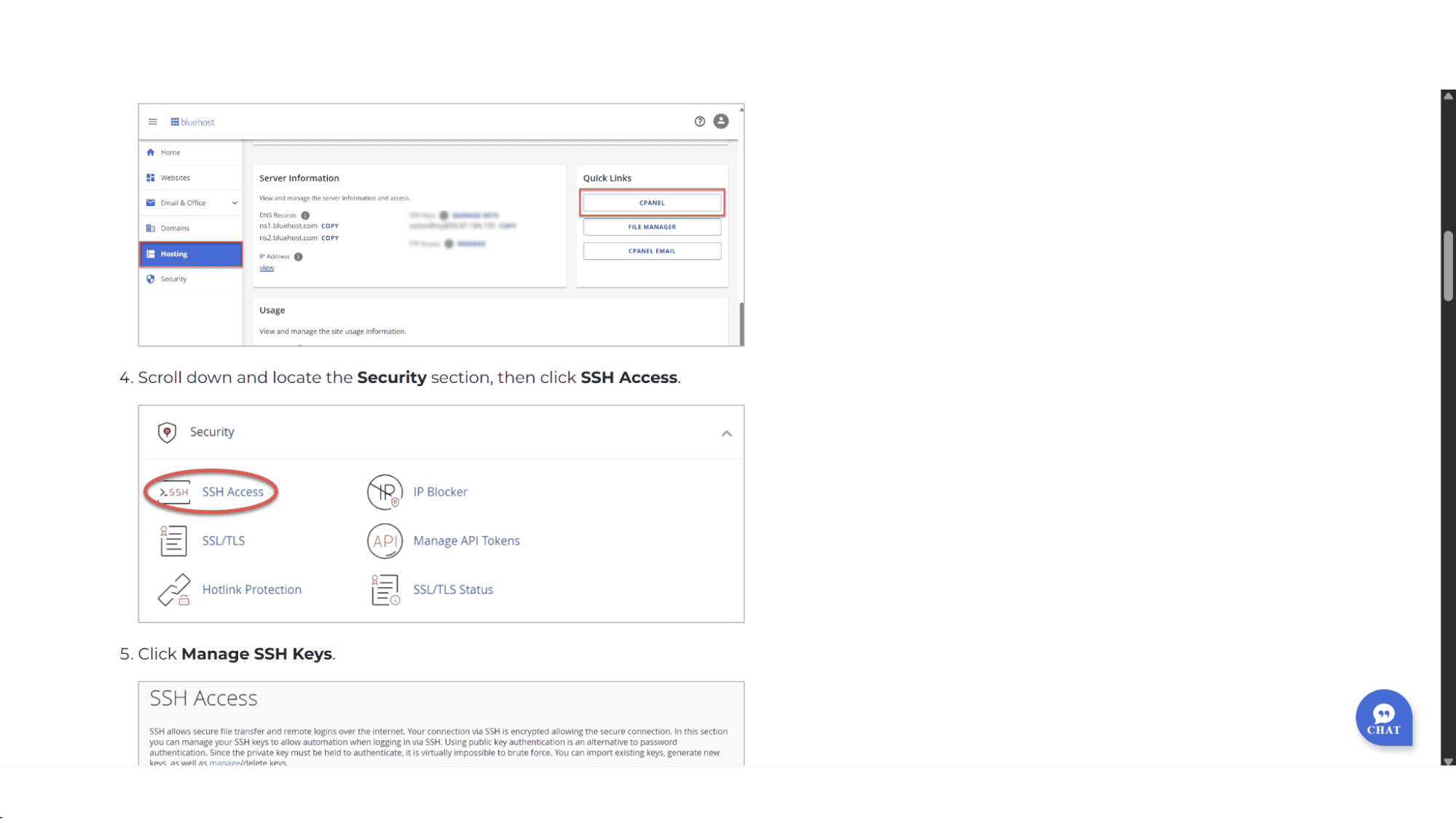
While a custom panel might handle the basics well, cPanel gives you full control without forcing you to always use the command lines.
My Verdict
Who is Bluehost cPanel For in 2025?
My opinion might be biased as I am a huge fan of cPanel. But, to be bluntly honest - Bluehost cPanel is not for everyone, but for its intended audience, it remains peerless.
It is the perfect fit for:
Web Developers and IT Professionals: The granular control, SSH access, and advanced features are indispensable for custom configurations and client work.
Small Business Owners who need full control: Once you learn the basics, managing your own email, domains, and databases from a single pane of glass is incredibly powerful.
Anyone who values a proven, standardized system: The knowledge that thousands of tutorials online are written specifically for this exact cPanel interface is a massive benefit.
It might be the wrong choice for:
The Absolute Newbie: The initial learning curve could be a bit steep and can be discouraging if you just want to build a simple site without spending too much time figuring out how this panel works.
Those looking for a more "modern" UX: If you prefer sleek, minimalist apps, cPanel will feel dated and clunky.
My Bottom Line:
Bluehost cPanel in 2025 is not trying to win any design awards...and why should it? It’s not the newest or the flashiest. What it is, however, is a battle-tested, incredibly powerful control panel that provides unparalleled access and control over your hosting environment. Its integration with Bluehost's plans is seamless, and for anyone who needs to do more than just the basics, it remains the undisputed king of control panels. Maybe it’s a bit messy, but every tool you could possibly need is right there on the wall, waiting for you.








