



For more details on other services and a closer look at Bluehost, check out the articles below.
Objective expert review Bluehost.com
Bluehost Dedicated Server Hosting Review 2025
We have all come to know Bluehost as the friendly, trustworthy, and highly rated hosting provider they are, the one that effortlessly gets your first WordPress site off the ground, and that helps with eagerness when you get stuck. But what happens when your digital presence evolves from a passionate project, such as a personal blog or small business website, into a serious, revenue-driving machine? When the limitations of shared or even cloud hosting begin to chafe and are simply not adequate anymore? That’s when you enter a new league - the league of dedicated servers. This is where things get a lot more serious, and frankly, where I was curious to see if a provider known for simplicity could truly deliver raw, uncompromising power.
In this 2025 review, I will take a good look at what Bluehost offers in terms of dedicated servers. We will go through what a dedicated server is, how easy it is to register, what options there are, the security, and beyond.

What Are You Buying When You Sign Up For A Bluehost Dedicated Server?
One concept we need to get straight right from the start is - a dedicated server is the opposite of shared hosting. To explain it in simple terms, try seeing it like this - You are not renting an apartment in a large building, you are purchasing the entire building. Every single component, whether it be CPUs, RAM, or the storage drives, is yours and yours alone. There are no noisy neighbours that can slow you down and use your resources, and you have the freedom to configure almost anything you want.
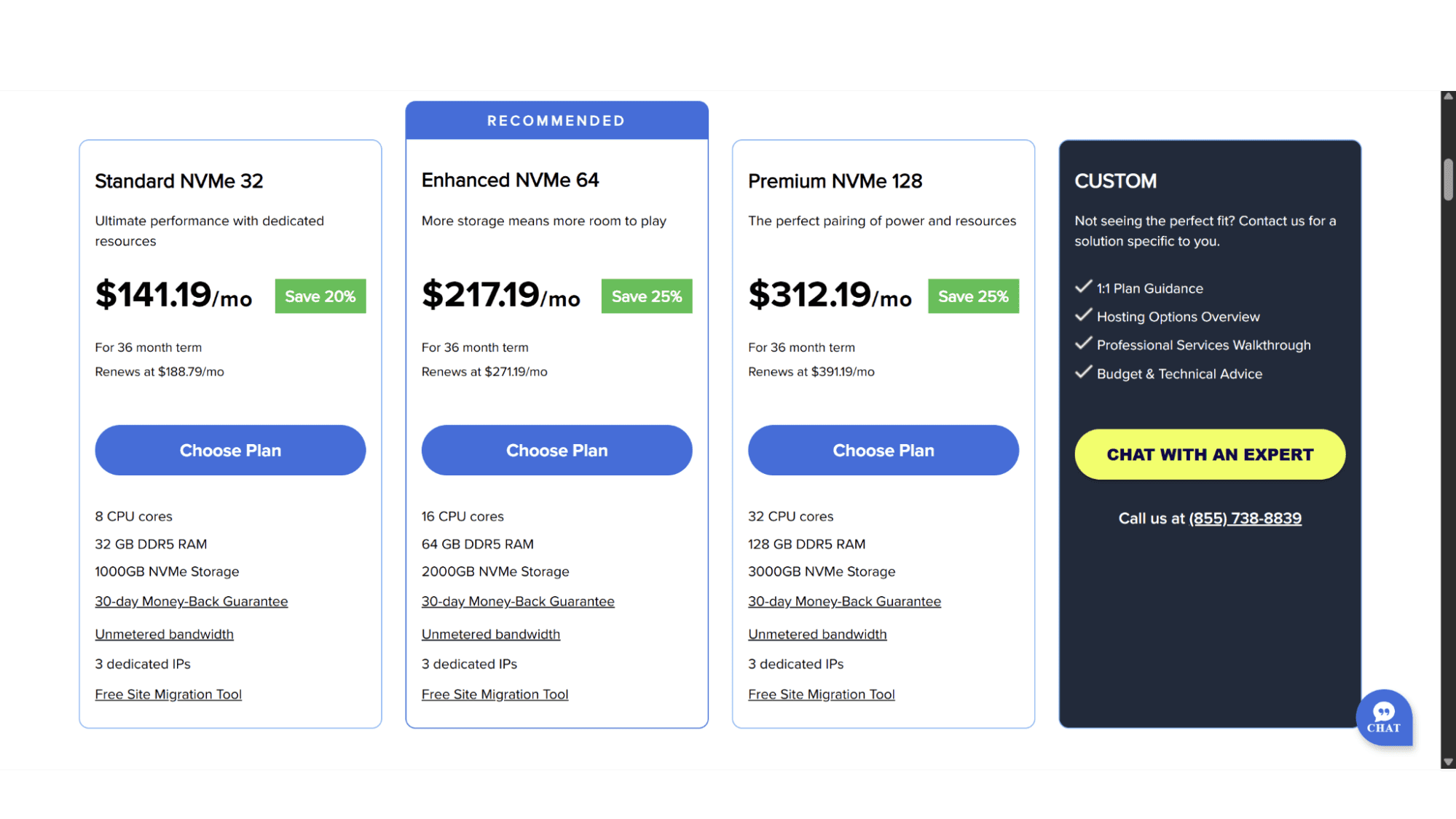
Bluehost's dedicated server plan options simplifies this potentially complex system into three straightforward plans for users to choose from. There is the Standard NVMe 32 plan, the Enhanced NVMe 64 plan, and lastly the Premium NVMe 128 plan. Should these not fit your needs, you can also get in touch with them to create a custom server for you.
The Bluehost Dedicated Server Plans
As mentioned earlier, Bluehost offers its users three dedicated server plans to choose from. They all come standard with dedicated IP addresses, full root access, free SSL certificates, and run on the latest-gen Xeon processors and blazing-fast NVMe storage drives.
However, one thing that will probably never change in the hosting industry, and Bluehost is no exception, is that the advertised starting price is always, or at least in most cases, very attractive, but you need to read the fine print. The true cost of ownership reveals itself at renewal time. So, let’s take a look at each plan in detail:
1. The Standard NVMe 32 Plan
This plan already comes in at an eye-watering $141.19 per month, with a renewal price of $188.79 per month after the initial 36-month term. Yes, it is very expensive, but it is also very well specced. If you are just getting started with dedicated servers, this plan is sure to be enough for quite some time. It includes:
- 8 CPU Cores;
- 32GB DDR5 RAM;
- 1000GB NVMe Disk Space.
2. The Enhanced NVMe 32 Plan
This plan is where their offering starts to feel substantial, doubling the CPUs, RAM, and NVMe storage space. It comes in at $217.19 per month, and after 36 months renews at $271.19 per month. This plan is suited for multiple sites or users that need much more power and performance out of their server. It includes:
- 16 CPU Cores;
- 64GB DDR5 RAM;
- 2000GB NVMe Storage Space.
3. The Premium NVMe 128 Plan
If you take a look at the plans, from their basic option to the top-tier one, you will notice that the performance leap from Standard to Premium is not incremental - it's monumental, but so is the price. This plan comes in at a hefty $391.19 per month (again for a 36-month term) and renews at $391.19 per month. Basically meaning that only bigger companies will be able to afford this option. It comes with:
- 32 CPU Cores;
- 128GB DDR5 RAM;
- 3000GB NVMe Disk Space.
Key Features:
- Excellent Performance and Complete Isolation: The raw performance is exactly what you pay for. Your site has the entire machine's resources at its disposal without sharing it with other users.
- Full Root Access and Control: This is the whole point of getting a dedicated server. You get full root access, meaning you can install any software, tweak or adjust any setting, and customize the server to your heart's content.
- Automated Backups: Their plans include a powerful tool called ARK (short for “Automated”, “Remote”, Knowledge”), which is a robust backup system. Configuring ARK is straightforward and provides a serious safety net for your entire machine - a feature I wish more providers would emphasize.
- A 99.99% Uptime Guarantee: Unlike their Cloud hosting, which comes with a 100% uptime guarantee, their dedicated server plans offer 99.99% which is still excellent and above the industry average.
Registration:
Getting started with a Bluehost dedicated server plan is a refreshingly straightforward process. Just go to their website (www.bluehost.com) and hover over either the “WordPress” or “Hosting” tab. Then click on “Dedicated Hosting”. The page that will be displayed will show the three plans. Simply choose one and click on “Choose Plan”. The next step would be to choose your domain name by entering your preferred name in the space provided. If it is available, it will automatically direct you to the next page, if it is not available, it will ask you to choose another one.

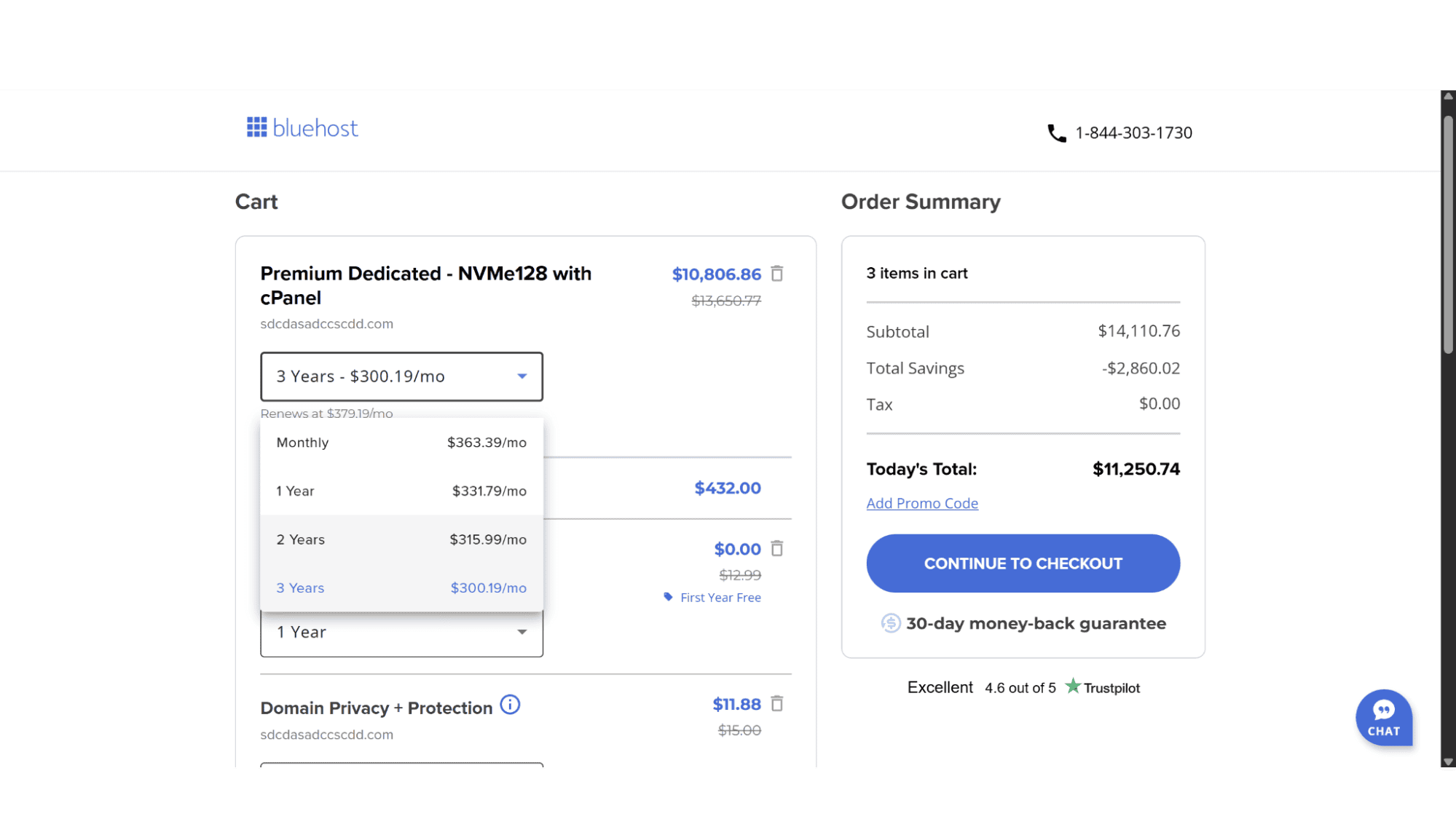
You'll then be taken to your cart to select a billing term - you can pay monthly or save by committing to one, two, or three years at a time. The final step is just filling in your account and payment details to wrap things up.
Managing your Bluehost Dedicated Server:
Wrapping your head around a new dedicated server can feel overwhelming, but Bluehost cleverly hands you the keys through a familiar dashboard -the cPanel control panel. Once your machine is up and running, you'll log into the very same cPanel interface you might know from shared hosting, but now with the raw power of your entire server behind it. From here, you can manage all aspects of your server. It effectively demystifies server management, letting you command enterprise-level hardware without needing to memorize a single line of command-line code.
Support:
Bluehost support is highly rated, and for good reason. They offer users 24/7 support via live chat or phone from friendly and well-trained agents. My direct experience revealed a capable and quick-reacting team, the level of support I feel is critical when working with dedicated servers. When you run a dedicated server, your support questions aren't about how to install a WordPress plugin. They are about kernel patches, RAID configurations, and ip tables rules.
Their first-line support via live chat is still geared toward common issues. When I posed a complex question about firewall configuration, the agent was polite but quickly had to escalate the ticket to their advanced server team. This is the correct protocol, but it means solutions aren't always immediate. The real expertise lies with their level 2 and 3 technicians, who provided detailed, knowledgeable responses.

My Bottom Line
For Whom Are the Bluehost Dedicated Servers Really Suited For?
In my opinion, Bluehost’s dedicated servers perfectly serve a specific niche. It is an excellent fit for the growing business that has outgrown its VPS plans, or that needs guaranteed performance, and has a sysadmin on staff (or a hired professional for that matter) who appreciates the simplicity of a pre-defined plan and the power of root access. The integration of cPanel and the ARK backup system makes it a manageable yet powerful environment. However, it is not a good right fit for the newbies or smaller businesses, due to the cost and complexity.
Bluehost’s Dedicated Server hosting in 2025 is a competent, powerful, and reliable option that successfully bridges the gap between their own simpler plans and the more intimidating, unmanaged providers.








