



You can find more information about other types of services, as well as reviews of Hosting.com, in the following articles.
Objective expert review Hosting.com
Hosting.com Managed WordPress & WooCommerce Hosting Review
A Speed and Security Powerhouse?
Having been in the hosting industry for what feels like forever, I'm always skeptical of providers who make bold promises, especially those who claim "enterprise-grade" performance at every possible level. Recently, I got the opportunity to review Hosting.com's managed WordPress and WooCommerce hosting plans, and to be honest, I expected a solid but perhaps a standard offering. I was, however, pleasantly surprised to find that they offer a platform built on a genuinely impressive foundation of both speed and security, that makes them a likely option for being one of the best-managed options out there. They include a lot of premium tech in their plans, but is it right for your site, or is it a total overkill for your needs? Let’s start this review to find out.
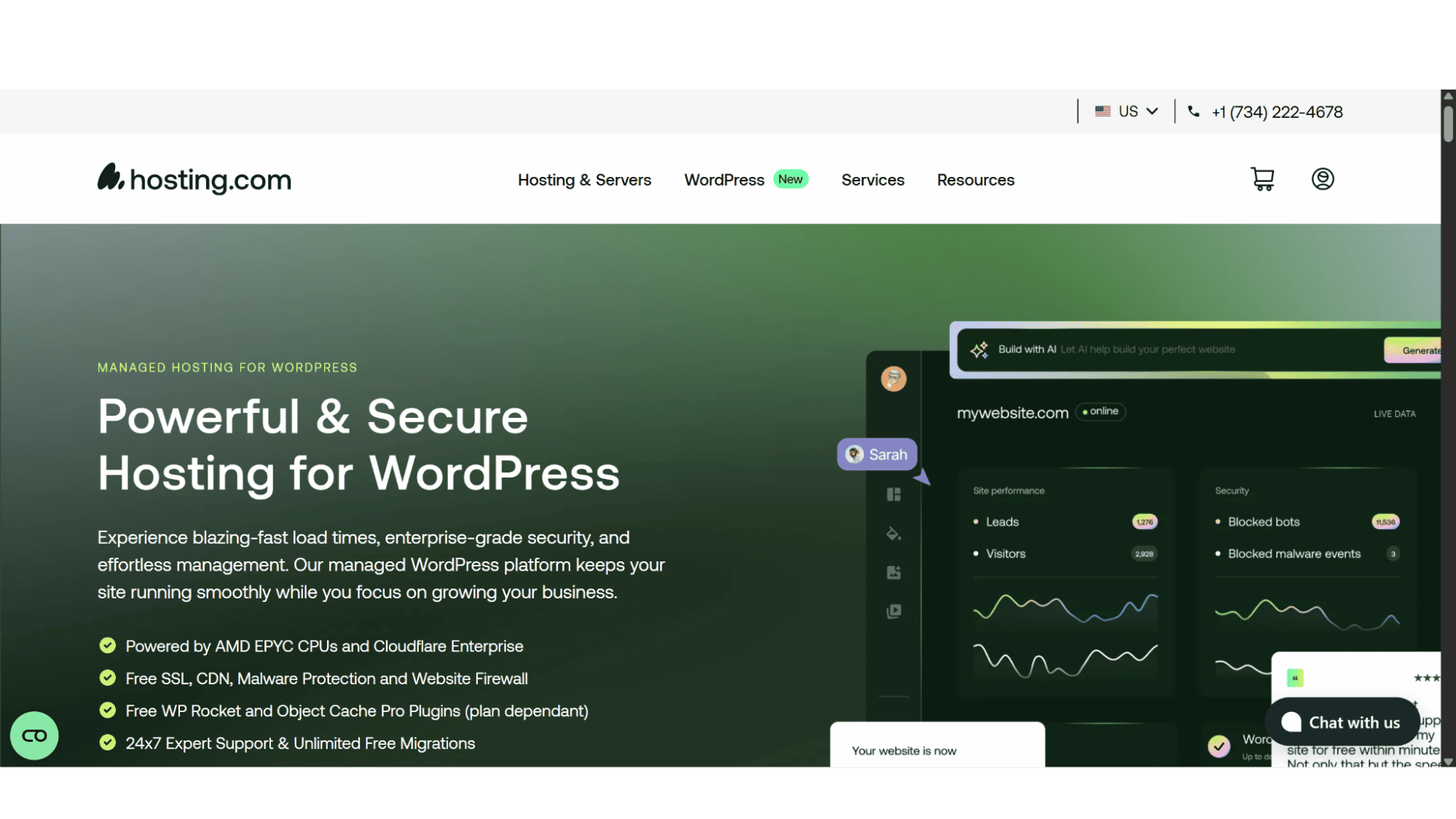
Hosting.com has been around for quite some time and have positioned their WordPress hosting as a fully managed, performance-obsessed service. In my personal experience, their bold promise of speed and hands-off management is actually accurate, thanks to its partnership with the infrastructure from Rocket.net and Cloudflare. The question isn't about if they are capable, but more about value. Are you a blogger, a growing business, or a high-traffic agency? The answer will determine if Hosting.com will suit your needs or if it’s a total, and quite expensive, mismatch.
A Plan-by-Plan Breakdown
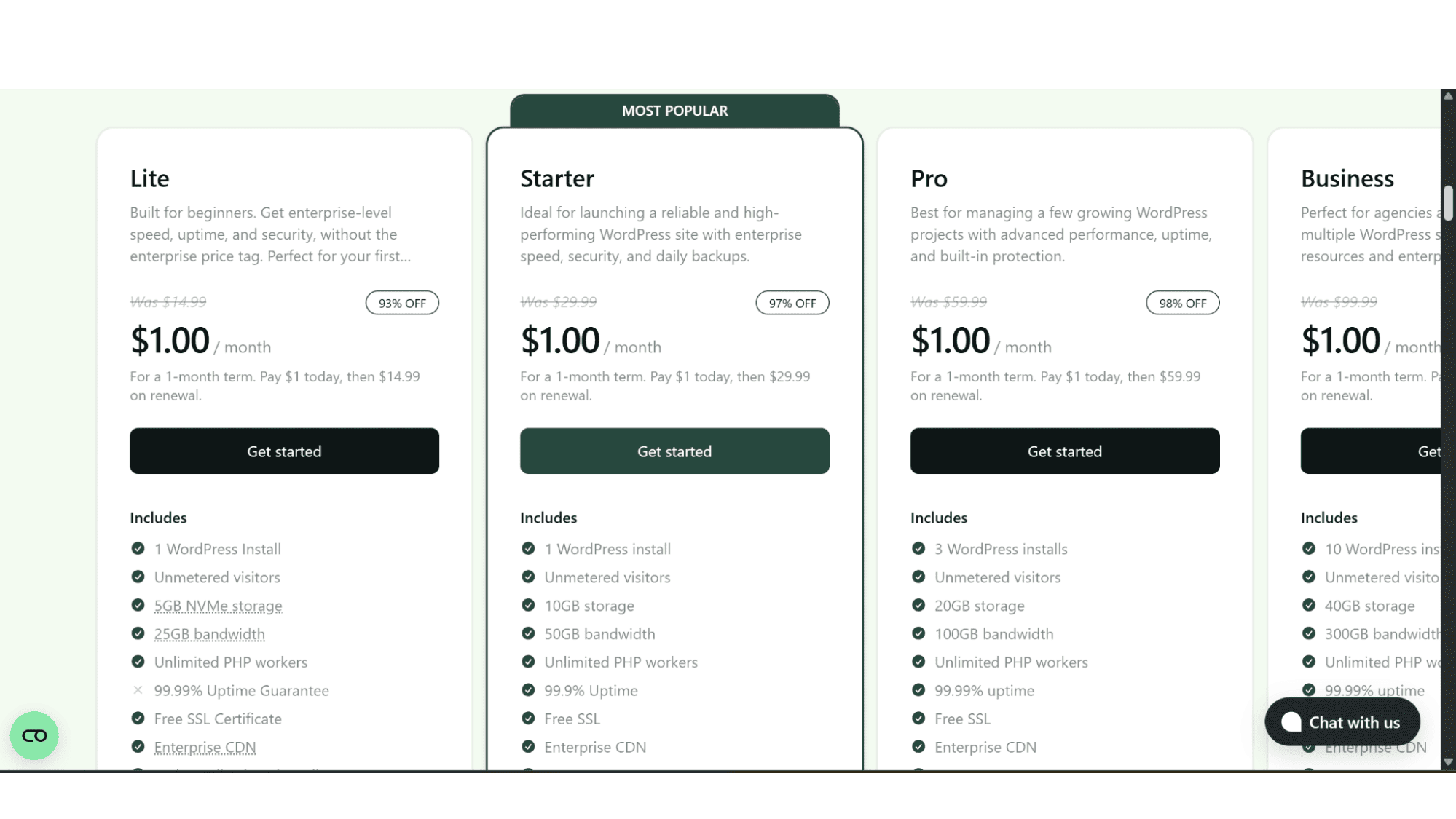
Let’s start with the standard WordPress hosting. The first thing you'll notice when you navigate to their WordPress hosting page (https://hosting.com/hosting/vps-hosting/managed/linux/), is the clean, straightforward presentation of the plans. With only 4 options to choose from, there's no endless scroll of confusing tiers. These plans start with the super-affordable “Lite” plan, their entry-level option, which includes 5GB NVMe disk space, 25GB bandwidth, and a limit of 1 WordPress installation, and goes for only $1 per month. But unfortunately, when renewal time comes, it will jump to $14.99 per month, so one needs to be aware of that! On the other end of the spectrum, they have the “Business” plan which features 40GB blazing-fast NVMe disk space, 300GB bandwidth, and a limit of 10 WordPress installations. This plan also comes with a free WP Rocket and Object Cache Pro plugins. The Business plan will also cost just $1 for the first month but will then increase to an eye-watering $99.99 per month! Rather expensive if you ask me.
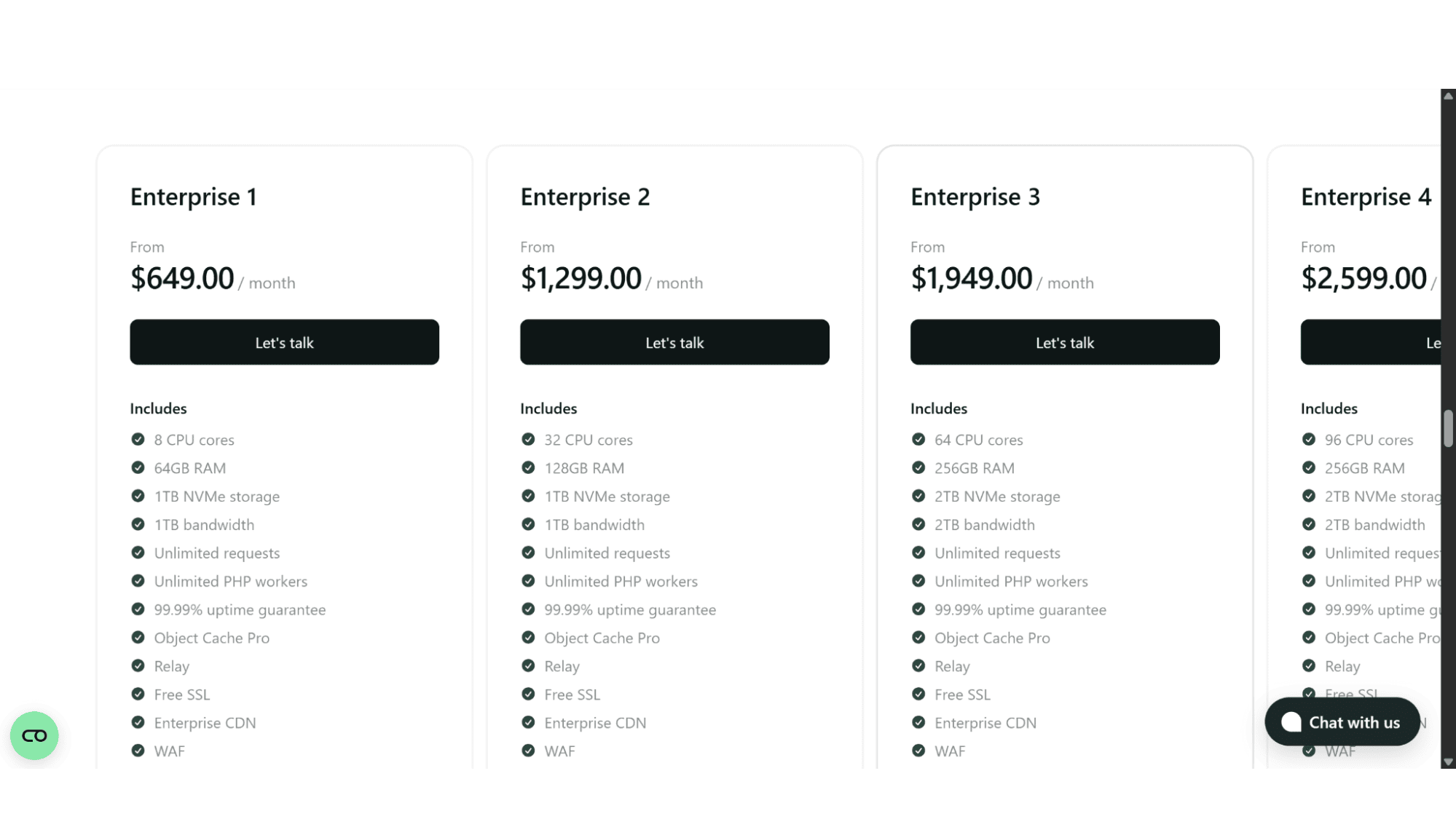
Their WooCommerce hosting plans come in three categories, Managed (the exact same plans as their standard WordPress hosting), Agency, and Enterprise. The Agency plans all start with a $1 for the first month but increases significantly to $99.99 on the “Tier 1” option, all the way up to $399.99 for the “Tier 4” option. The only difference between them is the size of NVMe disk space, bandwidth, and the number of sites you are allowed to install. For me personally this doesn’t make sense as one might as well just get your own managed VPS server from another provider for that price. The Enterprise plans are even more costly, as they go from $649 per month for the “Enterprise 1” plan, which includes 8 vCPUs, 64GB RAM, and 1TB NVMe disk space, up to an unbelievable $2599 per month for the “Enterprise 4” plan, which comes with 96 vCPUs, 256GB RAM, and 2TB NVMe disk space. This makes me very curious as to who can afford to spend that per month on hosting, and even more so - who in the world needs that many CPUs?
What's Included on Every Plan (The Good Stuff):
Blazing-Fast Infrastructure: All their plans run on AMD EPYC CPUs and lightning-fast NVMe disk drives.
Enterprise CDN (content delivery network) & Good Security: The inclusion of Cloudflare Enterprise is a massive win in my opinion. This isn't just the free tier they include, but the enterprise version which brings global edge caching, a powerful Web Application Firewall (WAF), as well as DDoS protection.
Managed Services: This means that they will handle the WordPress core updates, do real-time malware monitoring, and run daily backups.
Premium Caching: The higher-tier plans come with the WP Rocket plugin and Object Cache Pro for excellent speed optimization.
Great Support: You get around-the-clock support from WordPress experts via live chat and tickets. Response times are also quick, in my experience under a minute each time!
Free & Unlimited Migrations: Their team will move your site for you at no cost.
Staging Environment: Every site gets a development/staging URL for safe testing.
What's Not Included or Comes with Limits (The Fine Print):
Free Domain Names: A domain registration is not included in their hosting plan price.
Email Hosting: This isn’t included as standard, so you will need to sign up for professional email accounts, such as Google Workspace or Microsoft 365 yourself.
Unlimited Resources: Despite the premium feel (and price for that matter), plans come with set limits on disk space, visits, and bandwidth.
The Signup & Registration Process
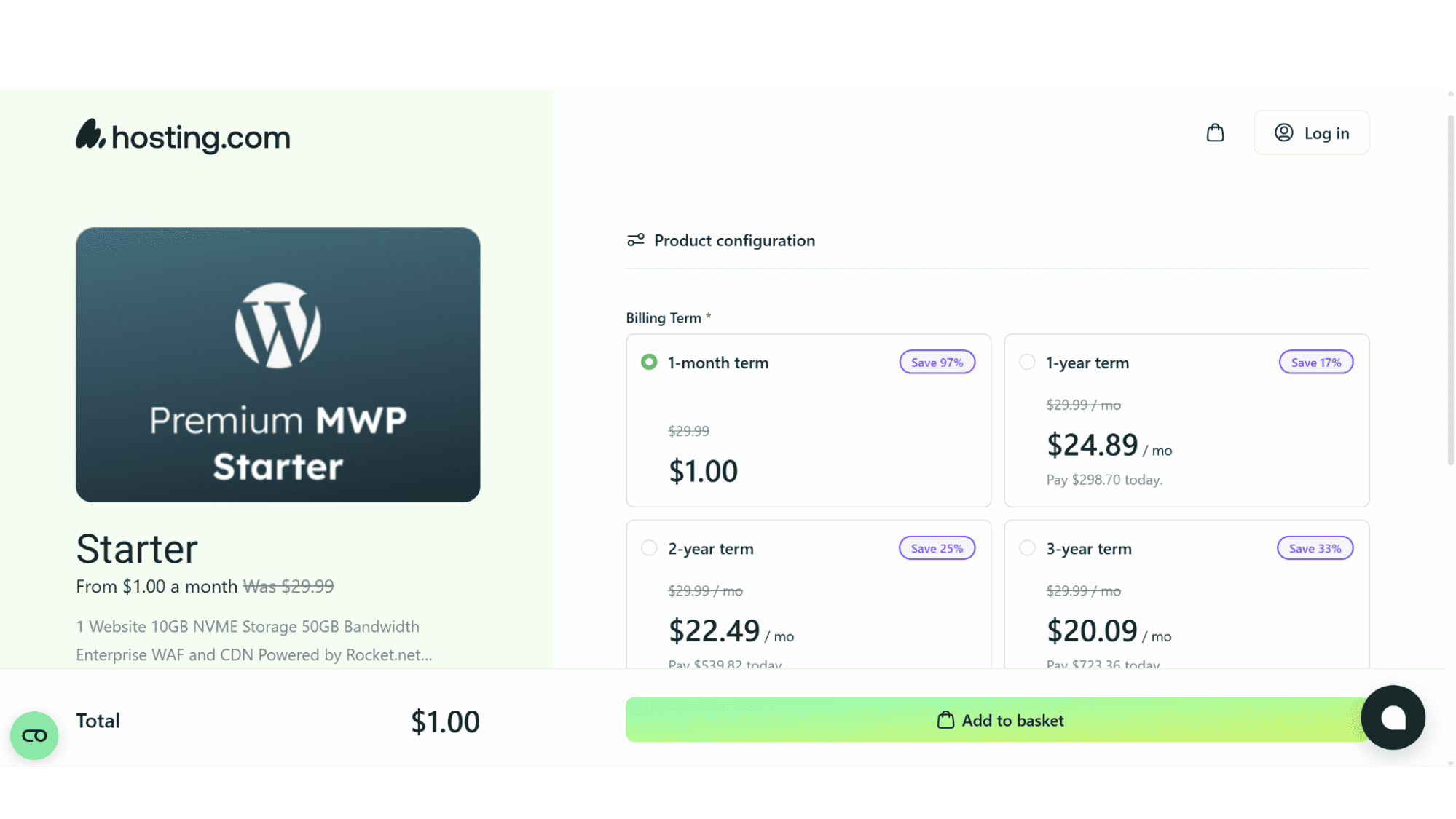
Getting your WordPress or WooCommerce site live on Hosting.com is refreshingly straightforward and quick to do. You simply need to go over to their website (www.hosting.com), and hover over the “WordPress” tab in the top main menu. The dropdown menu will the display the 2 options, features, and available plugins. You then need to choose between the “Hosting for WordPress” or “Hosting for WooCommerce” to see the full breakdown. Once you click on the "Get Started" button on your chosen plan, their very streamlined process will begin by asking you to choose your billing cycle (the options are 1 month, 1 year, 2 years, or 3 years at a time), next you would need to create an account if you don't have one yet, and the last step would be to enter your preferred payment method.
That’s really it. You won’t need to install WordPress or WooCommerce yourself, and as soon as you have signed up, you will have access to their control panel, from where you can log into your WordPress dashboard and use the built-in tools to design your site, or even to get in touch with their migration team if you need to move an existing site or store over.
Pros vs. Cons
My Honest Take on Their Offerings
Pros:
Excellent Speed & Uptime: The performance you get from the premium AMD EPYC CPUs bundled with super-fast NVMe drives and Enterprise CloudFlare CDN is simply outstanding and also very reliable.
True "Hands-Off" Management: They handle all the core updates, the security, as well as any performance tuning.
Excellent Security: Their plans come standard with the integrated Cloudflare Enterprise web application firewall (WAF), which is a premium feature one rarely sees at all plan levels.

Expert, Human Support: A lot of companies claim they offer “expert” WordPress support which rarely is, luckily this provider actually does.
Risk-Free Migration: They offer unlimited, free site migrations handled by their team to remove the biggest switching hurdle.
Cons:
Not The Cheapest Provider: Hosting.com is one of the most expensive providers I have seen when it comes to WordPress and WooCommerce hosting. In my opinion their prices are well above industry standards and don't make sense.
Limits on Resources: All their plans come with storage and visit limits, which may not suit sites with big media libraries, or millions of monthly visitors, that want to sign up for one of the entry-level options.
No Email as Standard: Because they don’t include this as standard, you will have to set up and pay for a separate service yourself.
Who in my opinion is Hosting.com’s WordPress and WooCommerce Really For?
After looking at all they have to offer and testing them out myself, I can confidently say Hosting.com's managed WordPress and WooCommerce hosting is a great option, but for the right user. I would say:
Yes, if:
- You have an unlimited budget and run a business-critical website or WooCommerce store where speed, security, and uptime directly impact your revenue and reputation.
- You are a busy business owner, developer, or agency who doesn't have the time to manage things like server updates and security patches.
- You want that premium performance and expert support and don’t mind paying premium prices for the peace of mind it brings.
You might want to rather look elsewhere if:
- You are running a personal blog or brand-new WordPress website with very low traffic and if you are on a tight budget. There are much more affordable shared hosting options out there to start with.
- You need unlimited storage on a low-cost plan or prefer an all-in-one solution that includes email hosting.
- You are tech savvy and prefer granular control over a bare server and want to configure every aspect yourself.
My The Final Word
Hosting.com isn't trying to be the cheapest option in the market – which they very clearly are not! They are rather aiming to be the most reliable, secure, and fastest managed WordPress platform you can buy. The integration of Cloudflare Enterprise alone adds a lot of value that could almost justify the price for serious users.
If you need the best possible performance for your website and you see hosting as a strategic investment rather than an expense, then Hosting.com delivers an excellent, high-performance package that will live up to its promises. Just be sure to choose a plan with enough resources for your growth.








