



To learn more about other services and read a detailed review of Westhost, check out the posts below.
Objective expert review WestHost.com
Westhost VPS Review 2026
Enterprise-Grade Muscle for Demanding Projects
Westhost is a well-known US-based hosting provider that spun up their first VPS server way back in 2003. I have heard a lot of them before and was always curious about how they perform and what they are all about. Recently, I got an opportunity to review them – my chance to finally find out! They have evolved massively since that first VPS, and nowadays they provide state-of-the-art solutions to give their clients more control and features.
Westhost itself markets budget shared hosting mostly, but the moment you click on their "VPS Hosting" tab on their website, you are seamlessly redirected to Ingenuity Cloud Services. This luckily isn’t a glitch on their website, as both brands form part of the THG Ingenuity Cloud Services group, which was formerly known as the UK2 Group. So, when you are looking at their VPS options, they are simply moving you from a consumer brand to the group's dedicated enterprise cloud arm. In this review, I will look at what that really means for you, the end user in 2026, in terms of power, flexibility, and budget. Let’s start by looking at their plans, the Westhost VPS pricing 2026, and options.

Westhost Cloud VPS
Ingenuity Cloud Services VPS Plans Overview: A Developer's Playground
Westhost / Ingenuity Cloud Services (ICS) offers potential users 8 plans to choose from, which are clearly presented on their website, each showing the exact number of CPUs, RAM, storage space, bandwidth, and price (you choose between USD or GBP as the currency) you will be paying, straightforward with no hidden surprises. Their storage drives run on enterprise-grade SSD and NVMe disk drives, and you will be able to manage your server either with the Ingenuity Cloud Services Control Panel, which we will briefly discuss later in this review, or by API and command lines.
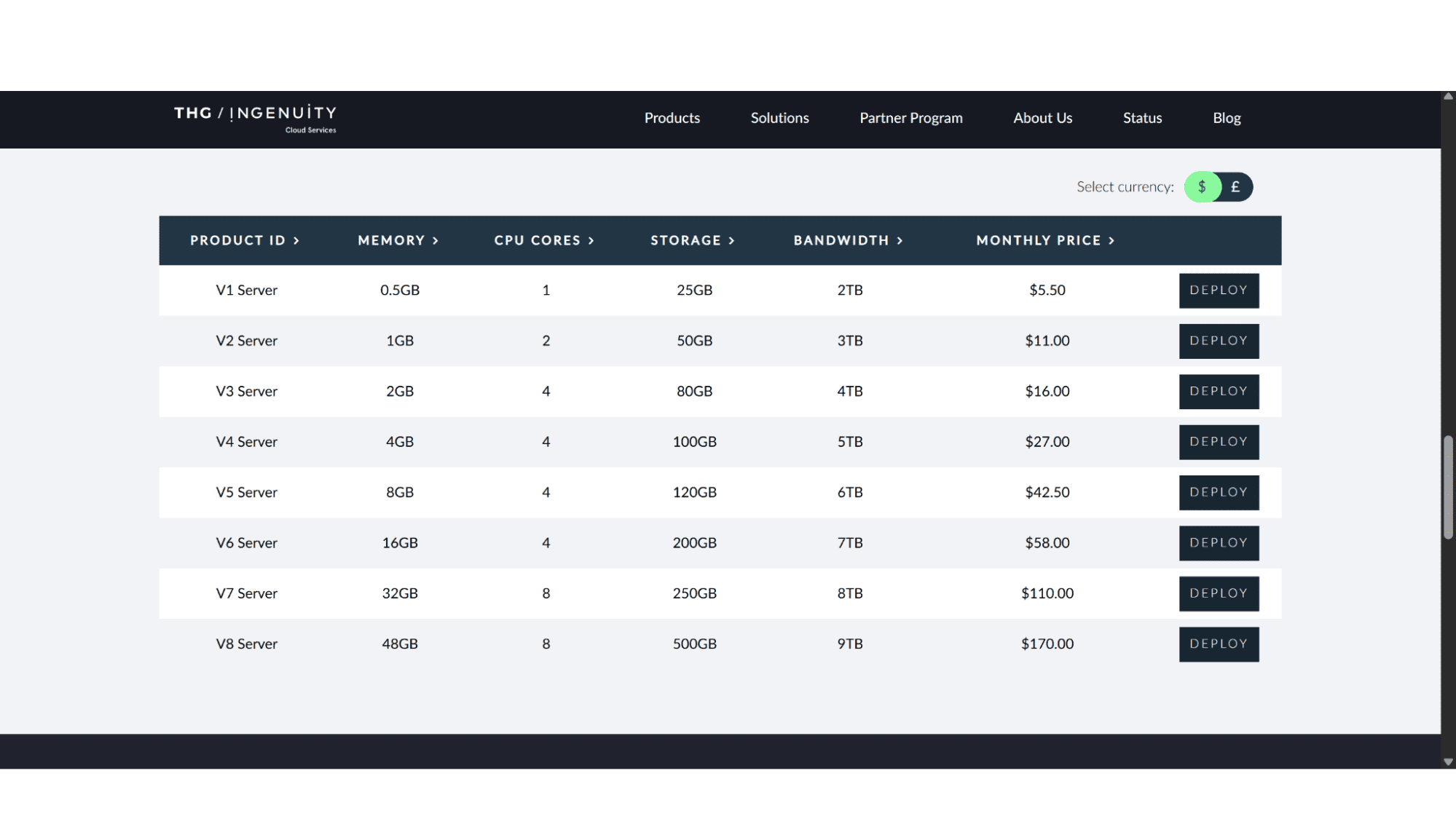
As mentioned before, there are 8 distinct plans to choose from. These range from 0.5GB RAM, 1 CPU, 25GB storage space, and 2TB traffic on the V1 Plan, their entry-level option, making it not much more powerful than a standard shared hosting plan, and also rather costly as it goes for $5.50 per month considering what’s included. It is probably best suited for small static websites, for testing, or for learning Linux.
On the other end of the spectrum, they offer the V8 Plan which will set you back $170 per month. Yes, I know you are thinking that sounds outrageously expensive, but what you get for that price is a beast of a machine! This plan comes with 48GB RAM, 8 CPUs, 500GB Disk Space, and 9TB of traffic, making it perfect for large-scale applications, complex development sites, Memory-intensive analytics, virtualization, massive databases, and anything in-between.
One thing that stands out massively is the sheer difference between their entry-level and top-tier plan, and this just highlights how they carefully designed their plans to cater for pretty much anyone in need of a VPS server. The Westhost cloud pricing 2026 vps can go from affordable to quite expensive, so if these set plans don’t appeal to you, you can also get in touch with their support to design and build your own server with the specs you require.
What's Included as Standard?
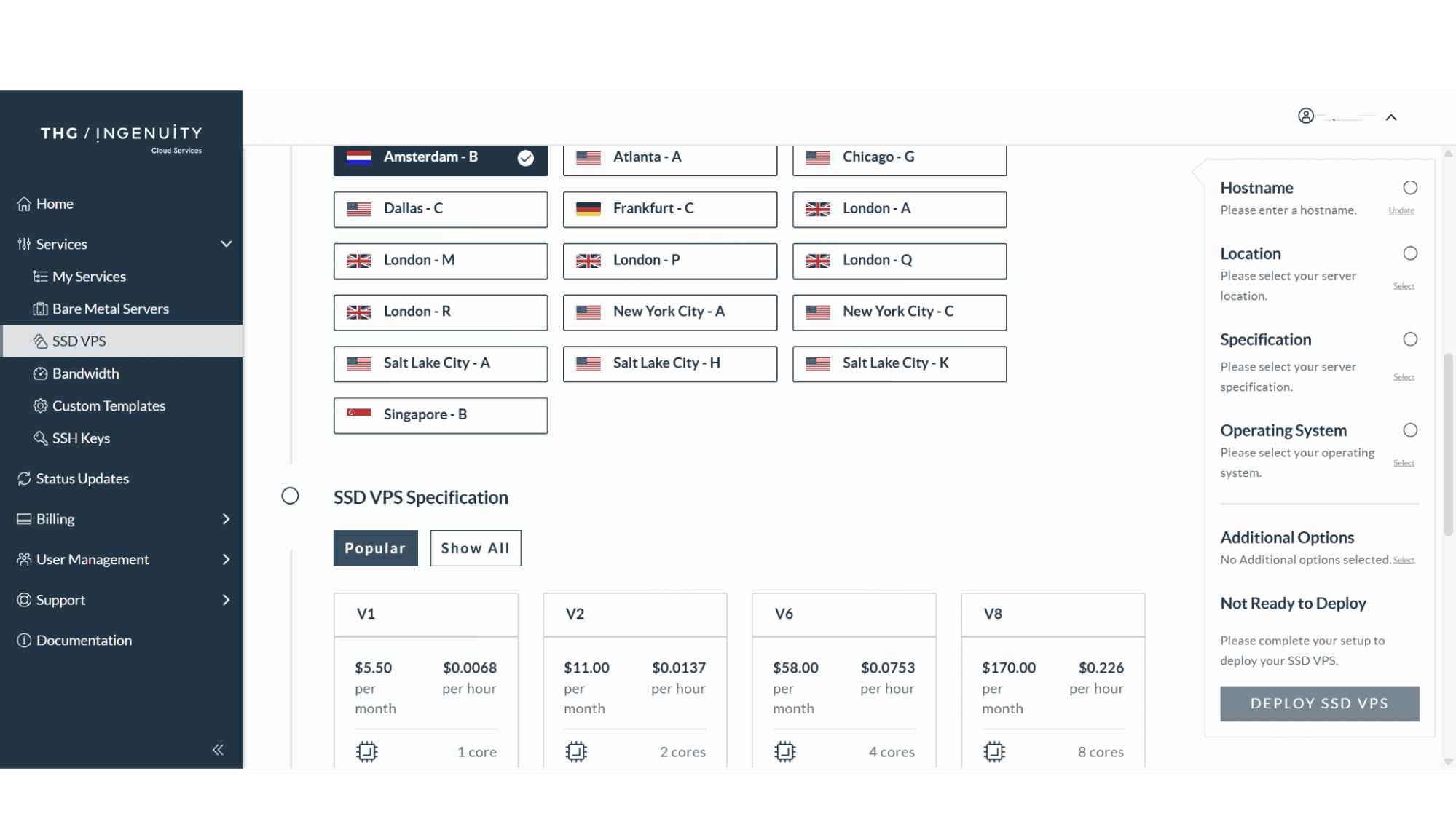
Data Center Location Options: Users can choose between the USA (Various options, UK (various options), the Netherlands, Germany, or Singapore.
KVM Virtualization: For complete isolation and performance.
Full Root/Administrator Access: Total control is a given. You can manage your server through API or command lines if you prefer it over their control panel.
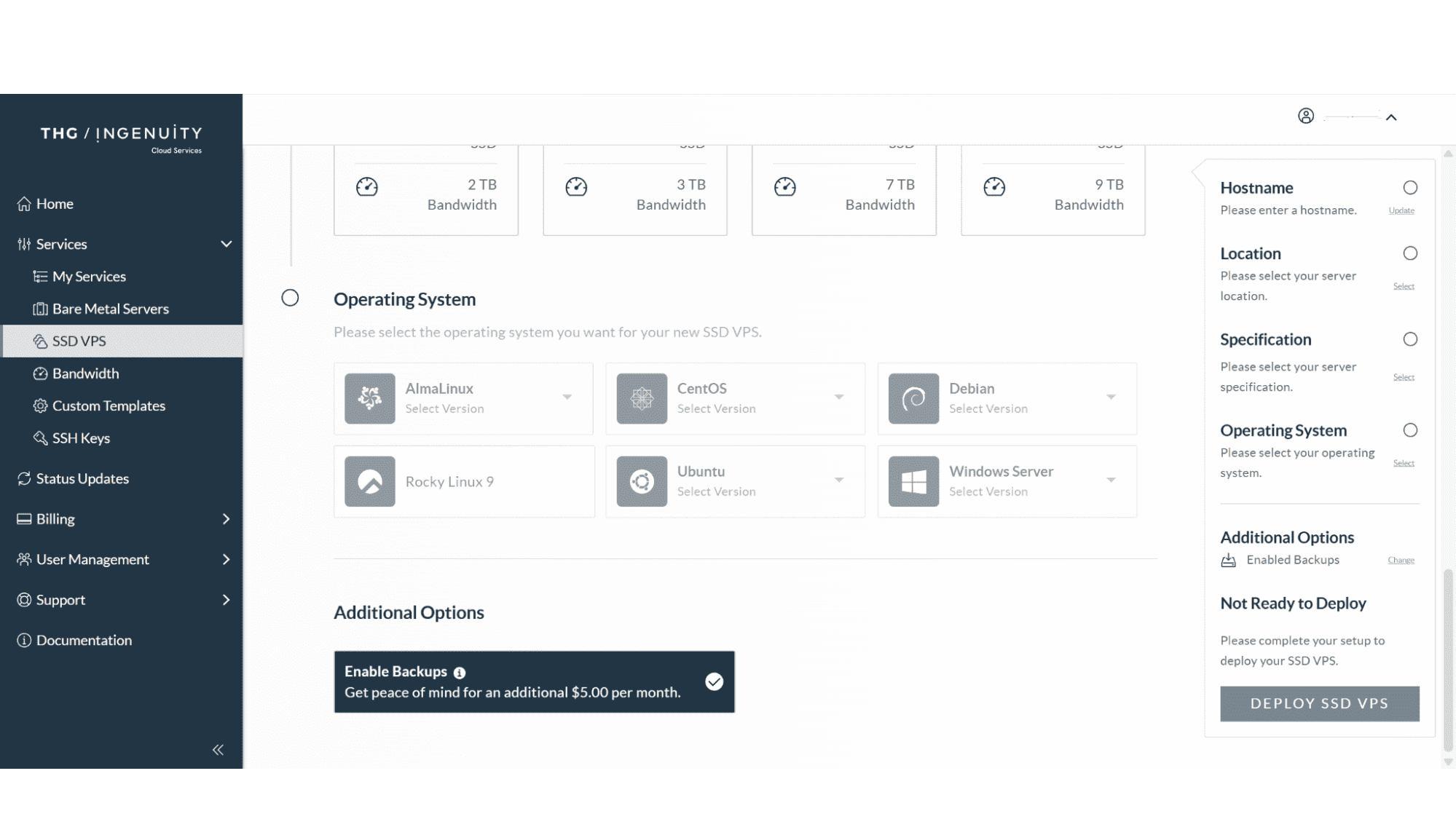
Choice of Operating System: A decent variety of operating systems are available, such as CentOS, Ubuntu, Debian, AlmaLinux and, importantly, Windows Server options (this will be for an additional cost for the license fee).
SSD Disk Drives: All storage is on blazing-fast SSD drives.
Dedicated IP Address: ICS includes one IP address, but you can request more from their support for an additional monthly fee.
What's Not Included?
These are Unmanaged Servers: This is critical. ICS provides these premium, powerful hardware and networks, but you manage everything else such as patches, updates, security, and more. This is an unmanaged service.
No Mainstream Control Panel: cPanel/WHM or Plesk are not included. You install and license these separately if needed, however, they do include their very own Ingenuity Cloud Control Panel. It might take some time to get used to, but it does the job and actually works really well.
Basic Security Foundation: This slightly swings back to the first point. You get a robust network and a clean OS installation. Firewall configuration, OS hardening, and software security patches are your responsibility. I do recommend you take their DDoS protection as an add-on.
No Managed Backups: You must put your own backup solution in place, and this is important. If things go wrong or your data gets breached, you need to have backups or a way to restore your data – I can’t stress this enough.
The Ingenuity Cloud Control Panel
Your Central Hub for Virtual Infrastructure Management
They include their very own, custom-created control panel, The Ingenuity Cloud Control Panel, in all their VPS plans. This panel is a web-based management hub that puts you in direct command of your VPS server. From their dashboard, users you can do all the important day-to-day tasks for your virtual servers, such as power servers on or off, reboot them, reinstall operating systems, manage network settings, monitor real-time resource usage like CPU and bandwidth, access console connectivity, and more, without ever needing to run any command-lines, although they also offer that option for those that prefer it. Personally, I found it quite simple and easy to use, but for some it might take some time getting used.
The Westhost / ICS Purchase & Registration Process
Straightforward and Easy
The sign-up process is quick and straightforward, but business-like. As this review is about Westhost, we will start with their website. Simply open your browser and head over to www.westhost.com, then click on the “Servers” tab in the top main menu. A dropdown menu will then appear. You then click on “VPS Hosting” which will redirect you to the VPS Servers page on the Ingenuity Cloud Services website (https://www.ingenuitycloudservices.com/products/virtual-servers/). One thing that immediately stood out for me is how clean and uncluttered this page is, with the 8 options clearly laid out. After making your choice click on “Deploy” next to the plan you chose. You will then be asked to either sign-in if you are an existing user, or to create an account if you are a new user.

The registration process is fast as you only need to supply some basic personal information, then verify your email address, and your account will then be activated. Quick and simple. The whole process should take no more than 5 minutes!
ICS Support & Security
24/7 Support: If things go wrong, you can reach out to their friendly support agents via email, phone (there’s US and UK numbers), or support tickets. In my experience their agents were very professional and extremely technical. One needs to keep in mind that their main focus is infrastructure and hardware only, so don't expect them to help you debug your PHP code.
Security: ICS and their team provide world-class physical and network security, but you are in charge of the security for your own virtual machine.
Pros:
Premium Hardware: They include enterprise-grade components in their servers.
Straightforward Pricing: What you see is what you pay. There’s no catch or nasty surprises when it comes to renewal costs.
Full Control & Flexibility: Choose from one of the pre-designed plans or build the exact server you need.
Multiple Data Center Choices: You can place your server as close to your target audience as possible.
Windows or Linux: They offer servers in both Linux or Windows.
Cons:
Unmanaged VPS: If you are not technical, you might need to hire someone to manage your server, which will add to the monthly cost.
Support is Infrastructure-Only: No hand-holding on software issues.
My Verdict
Is Ingenuity Cloud Services VPS the Right Fit for You in 2026?
I would say yes, if you are a developer, a tech-focused business, or have at least a basic sysadmin skillset. If you fall into this category, then these services are definitely for you. They offer such a broad range of servers, catering for anyone from basic testing servers, all the way up to servers that need to be able to handle custom applications, game servers, or complex services, that it is hard to ignore their offerings. But, as mentioned before, these plans are unmanaged, so if you lack technical skills, I would suggest you look elsewhere for a VPS. Their plans are reasonably prices, but not the cheapest I have seen, and to add costs for someone else to manage your server will make them too expensive to be honest.
My bottom line
Westhost, via Ingenuity Cloud Services, offers a powerful IaaS (Infrastructure as a service) proposition. It's a reliable hosting powerhouse for those who want the reins firmly in their hands, and for the right user, it provides unmatched performance and flexibility. For others, however, the very lack of management that defines its value is its biggest drawback. Go in with your eyes open, and you'll find a top-tier builder's platform.








